 dda9f81d37
|
||
|---|---|---|
| .. | ||
| local.tools | ||
| datautils.mjs | ||
| idb.mjs | ||
| index.html | ||
| main.js | ||
| readme.md | ||
| simplechat.css | ||
| simplechat.js | ||
| simplechat_screens.webp | ||
| test-tools-cmdline.sh | ||
| tooldb.mjs | ||
| tooljs.mjs | ||
| tools.mjs | ||
| toolsconsole.mjs | ||
| toolsdbworker.mjs | ||
| toolsworker.mjs | ||
| toolweb.mjs | ||
| ui.mjs | ||
| xpromise.mjs | ||

readme.md
SimpleChat
by Humans for All.
quickstart
To run from the build dir
bin/llama-server -m path/model.gguf --path ../tools/server/public_simplechat --jinja
Continue reading for the details.
overview
This simple web frontend, allows triggering/testing the server's /completions or /chat/completions endpoints in a simple way with minimal code from a common code base. Additionally it also allows end users to have single or multiple independent chat sessions with back and forth chatting to an extent, with the ai llm model at a basic level, with their own system prompts.
This allows seeing the generated text / ai-model response in oneshot at the end, after it is fully generated, or potentially as it is being generated, in a streamed manner from the server/ai-model.
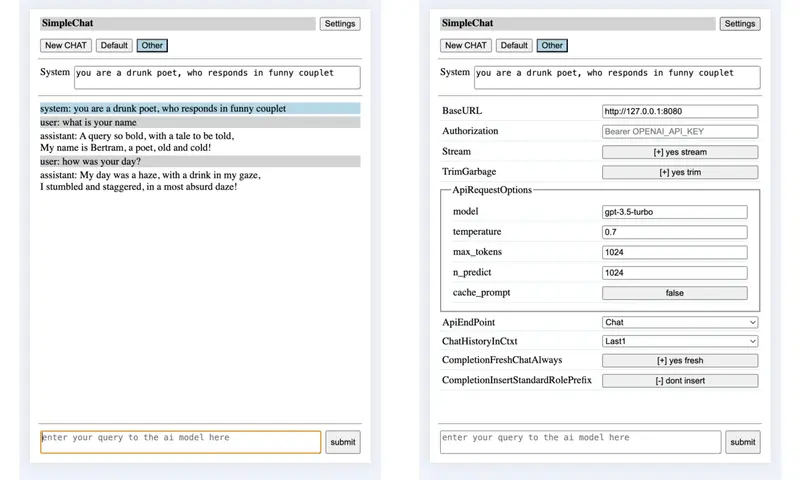
Auto saves the chat session locally as and when the chat is progressing and inturn at a later time when you open SimpleChat, option is provided to restore the old chat session, if a matching one exists. In turn if any of those chat sessions were pending wrt user triggering a tool call or submitting a tool call response, the ui is setup as needed for end user to continue with those previously saved sessions, from where they left off.
The UI follows a responsive web design so that the layout can adapt to available display space in a usable enough manner, in general.
Allows developer/end-user to control some of the behaviour by updating gMe members from browser's devel-tool console. Parallely some of the directly useful to end-user settings can also be changed using the provided settings ui.
For GenAi/LLM models supporting tool / function calling, allows one to interact with them and explore use of ai driven augmenting of the knowledge used for generating answers as well as for cross checking ai generated answers logically / programatically and by checking with other sources and lot more by making using of the simple yet useful predefined tools / functions provided by this client web ui. The end user is provided full control over tool calling and response submitting.
For GenAi/LLM models which support reasoning, the thinking of the model will be shown to the end user as the model is running through its reasoning.
For GenAi/LLM models with vision support, one can specify image file and get the ai to respond wrt the same.
NOTE: As all genai/llm web service apis may or may not expose the model context length directly, and also as using ai out of band for additional parallel work may not be efficient given the loading of current systems by genai/llm models, so client logic doesnt provide any adaptive culling of old messages nor of replacing them with summary of their content etal. However there is a optional sliding window based chat logic, which provides a simple minded culling of old messages from the chat history before sending to the ai model.
NOTE: Wrt options sent with the request, it mainly sets temperature, max_tokens and optionaly stream as well as tool_calls mainly for now. However if someone wants they can update the js file or equivalent member in gMe as needed.
NOTE: One may be able to use this to chat with openai api web-service /chat/completions endpoint, in a very limited / minimal way. One will need to set model, openai url and authorization bearer key in settings ui.
usage
One could run this web frontend directly using server itself or if anyone is thinking of adding a built in web frontend to configure the server over http(s) or so, then run this web frontend using something like python's http module.
running directly using tools/server
./llama-server -m path/model.gguf --path tools/server/public_simplechat [--port PORT]
running using python3's server module
first run tools/server
- ./llama-server -m path/model.gguf
next run this web front end in tools/server/public_simplechat
- cd ../tools/server/public_simplechat
- python3 -m http.server PORT
for tool calling
remember to
-
pass --jinja to llama-server to enable tool calling support from the server ai engine end.
-
set tools.enabled to true in the settings page of the client side gui.
-
use a GenAi/LLM model which supports tool calling.
-
if fetch web page, web search or pdf-to-text tool call is needed remember to run bundled local.tools/simpleproxy.py helper along with its config file, before using/loading this client ui through a browser
-
cd tools/server/public_simplechat/local.tools; python3 ./simpleproxy.py --config simpleproxy.json
-
remember that this is a relatively minimal dumb proxy logic which can fetch html or pdf content and inturn optionally provide plain text version of the content by stripping off non textual/core contents. Be careful when accessing web through this and use it only with known safe sites.
-
look into local.tools/simpleproxy.json for specifying
- the white list of allowed.schemes
- you may want to use this to disable local file access and or disable http access, and inturn retaining only https based urls or so.
- the white list of allowed.domains
- review and update this to match your needs.
- the shared bearer token between server and client ui
- the white list of allowed.schemes
-
-
other builtin tool / function calls like datetime, calculator, javascript runner, DataStore dont require the simpleproxy.py helper.
for vision models
- remember to specify the multimodal related gguf file directly using -mmproj or by using -hf to fetch the llm model and its mmproj gguf from huggingface.
- additionally specify a large enough -batch-size (ex 8k) and -ubatch-size (ex 2k)
using the front end
Open this simple web front end from your local browser
- http://127.0.0.1:PORT/index.html
Once inside
-
If you want to, you can change many of the default global settings
- the base url (ie ip addr / domain name, port)
- chat (default) vs completion mode
- try trim garbage in response or not
- amount of chat history in the context sent to server/ai-model
- oneshot or streamed mode.
- use built in tool calling or not and its related params.
-
In completion mode >> note: most recent work has been in chat mode <<
- one normally doesnt use a system prompt in completion mode.
- logic by default doesnt insert any role specific "ROLE: " prefix wrt each role's message. If the model requires any prefix wrt user role messages, then the end user has to explicitly add the needed prefix, when they enter their chat message. Similarly if the model requires any prefix to trigger assistant/ai-model response, then the end user needs to enter the same. This keeps the logic simple, while still giving flexibility to the end user to manage any templating/tagging requirement wrt their messages to the model.
- the logic doesnt insert newline at the begining and end wrt the prompt message generated. However if the chat being sent to /completions end point has more than one role's message, then insert newline when moving from one role's message to the next role's message, so that it can be clearly identified/distinguished.
- given that /completions endpoint normally doesnt add additional chat-templating of its own, the above ensures that end user can create a custom single/multi message combo with any tags/special-tokens related chat templating to test out model handshake. Or enduser can use it just for normal completion related/based query.
-
If you want to provide a system prompt, then ideally enter it first, before entering any user query. Normally Completion mode doesnt need system prompt, while Chat mode can generate better/interesting responses with a suitable system prompt.
- if chat.add_system_begin is used
- you cant change the system prompt, after it is has been submitted once along with user query.
- you cant set a system prompt, after you have submitted any user query
- if chat.add_system_anytime is used
- one can change the system prompt any time during chat, by changing the contents of system prompt.
- inturn the updated/changed system prompt will be inserted into the chat session.
- this allows for the subsequent user chatting to be driven by the new system prompt set above.
- if chat.add_system_begin is used
-
Enter your query and either press enter or click on the submit button.
- If you want to insert enter (\n) as part of your chat/query to ai model, use shift+enter.
- If the tool response has been placed into user input textarea, its color is changed to help user identify the same easily.
- allow user to specify a image file, for vision models.
-
Wait for the logic to communicate with the server and get the response.
- the user is not allowed to enter any fresh query during this time.
- the user input box will be disabled and a working message will be shown in it.
- if trim garbage is enabled, the logic will try to trim repeating text kind of garbage to some extent.
-
any reasoning / thinking by the model is shown to the end user, as it is occuring, if the ai model shares the same over the http interface.
-
tool calling flow when working with ai models which support tool / function calling
- if tool calling is enabled and the user query results in need for one of the builtin tools to be called, then the ai response might include request for tool call.
- the SimpleChat client will show details of the tool call (ie tool name and args passed) requested and allow the user to trigger it as is or after modifying things as needed. NOTE: Tool sees the original tool call only, for now
- inturn returned / generated result is placed into user query entry text area, and the color of the user query text area is changed to indicate the same.
- if user is ok with the tool response, they can click submit to send the same to the GenAi/LLM. User can even modify the response generated by the tool, if required, before submitting.
- ALERT: Sometimes the reasoning or chat from ai model may indicate tool call, but you may actually not get/see a tool call, in such situations, dont forget to cross check that tool calling is enabled in the settings. Also click on the current chat session's button at the top, to refresh the ui, just in case.
-
when the user is going through the chat messages in the chat session, they can
- delete any message from the chat session,
- remember that you need to maintain the expected sequence of chat message roles ie user - assistant - {tool response} - user - assistant - kind of sequence.
- copy text content of messages to clipboard.
- delete any message from the chat session,
-
ClearChat/Refresh
- use the clearchat button to clear the currently active chat session.
- just refresh the page, to reset wrt the chat history and system prompts across chat sessions
and start afresh.
- This also helps if you had forgotten to start the bundled simpleproxy.py server before hand. Start the simpleproxy.py server and refresh the client ui page, to get access to web access related tool calls.
- if you refreshed/cleared unknowingly, you can use the Restore feature to try load previous chat session and resume that session. This uses a basic local auto save logic that is in there.
-
Using NewChat one can start independent chat sessions.
- two independent chat sessions are setup by default.
-
When you want to print, switching ChatHistoryInCtxt to Full and clicking on the chat session button of interest, will display the full chat history till then wrt same, if you want full history for printing.
Devel note
Reason behind this
The idea is to be easy enough to use for basic purposes, while also being simple and easily discernable by developers who may not be from web frontend background (so inturn may not be familiar with template / end-use-specific-language-extensions driven flows) so that they can use it to explore/experiment things.
And given that the idea is also to help explore/experiment for developers, some flexibility is provided to change behaviour easily using the devel-tools/console or provided minimal settings ui (wrt few aspects). Skeletal logic has been implemented to explore some of the end points and ideas/implications around them.
General
Me/gMe consolidates the settings which control the behaviour into one object. One can see the current settings, as well as change/update them using browsers devel-tool/console. It is attached to the document object. Some of these can also be updated using the Settings UI.
-
baseURL - the domain-name/ip-address and inturn the port to send the request.
-
chatProps - maintain a set of properties which manipulate chatting with ai engine
-
apiEP - select between /completions and /chat/completions endpoint provided by the server/ai-model.
-
stream - control between oneshot-at-end and live-stream-as-its-generated collating and showing of the generated response.
the logic assumes that the text sent from the server follows utf-8 encoding.
in streaming mode - if there is any exception, the logic traps the same and tries to ensure that text generated till then is not lost.
- if a very long text is being generated, which leads to no user interaction for sometime and inturn the machine goes into power saving mode or so, the platform may stop network connection, leading to exception.
-
iRecentUserMsgCnt - a simple minded SlidingWindow to limit context window load at Ai Model end. This is set to 10 by default. So in addition to latest system message, last/latest iRecentUserMsgCnt user messages after the latest system prompt and its responses from the ai model will be sent to the ai-model, when querying for a new response. Note that if enabled, only user messages after the latest system message/prompt will be considered.
This specified sliding window user message count also includes the latest user query.
-
less than 0 : Send entire chat history to server
-
0 : Send only the system message if any to the server
-
greater than 0 : Send the latest chat history from the latest system prompt, limited to specified cnt.
-
-
bCompletionFreshChatAlways - whether Completion mode collates complete/sliding-window history when communicating with the server or only sends the latest user query/message.
-
bCompletionInsertStandardRolePrefix - whether Completion mode inserts role related prefix wrt the messages that get inserted into prompt field wrt /Completion endpoint.
-
bTrimGarbage - whether garbage repeatation at the end of the generated ai response, should be trimmed or left as is. If enabled, it will be trimmed so that it wont be sent back as part of subsequent chat history. At the same time the actual trimmed text is shown to the user, once when it was generated, so user can check if any useful info/data was there in the response.
One may be able to request the ai-model to continue (wrt the last response) (if chat-history is enabled as part of the chat-history-in-context setting), and chances are the ai-model will continue starting from the trimmed part, thus allows long response to be recovered/continued indirectly, in many cases.
The histogram/freq based trimming logic is currently tuned for english language wrt its is-it-a-alpabetic|numeral-char regex match logic.
-
-
tools - contains controls related to tool calling
-
enabled - control whether tool calling is enabled or not
remember to enable this only for GenAi/LLM models which support tool/function calling.
-
proxyUrl - specify the address for the running instance of bundled local.tools/simpleproxy.py
-
proxyAuthInsecure - shared token between simpleproxy.py server and client ui, for accessing service provided by it.
Shared token is currently hashed with the current year and inturn handshaked over the network. In future if required one could also include a dynamic token provided by simpleproxy server during /aum handshake and running counter or so into hashed token. ALERT: However do remember that currently the handshake occurs over http and not https, so others can snoop the network and get token. Per client ui running counter and random dynamic token can help mitigate things to some extent, if required in future.
-
searchUrl - specify the search engine's search url template along with the tag SEARCHWORDS in place where the search words should be substituted at runtime.
-
searchDrops - allows one to drop contents of html tags with specified id from the plain text search result.
- specify a list of dicts, where each dict should contain a 'tag' entry specifying the tag to filter like div or p or ... and also a 'id' entry which specifies the id of interest.
-
iResultMaxDataLength - specify what amount of any tool call result should be sent back to the ai engine server.
- specifying 0 disables this truncating of the results, and inturn full result will be sent to the ai engine server.
-
toolCallResponseTimeoutMS - specifies the time (in msecs) for which the logic should wait for a tool call to respond before a default timed out error response is generated and control given back to end user, for them to decide whether to submit the error response or wait for actual tool call response further.
-
autoSecs - the amount of time in seconds to wait before the tool call request is auto triggered and generated response is auto submitted back.
setting this value to 0 (default), disables auto logic, so that end user can review the tool calls requested by ai and if needed even modify them, before triggering/executing them as well as review and modify results generated by the tool call, before submitting them back to the ai.
this is specified in seconds, so that users by default will normally not overload any website through the proxy server.
the builtin tools' meta data is sent to the ai model in the requests sent to it.
inturn if the ai model requests a tool call to be made, the same will be done and the response sent back to the ai model, under user control, by default.
as tool calling will involve a bit of back and forth between ai assistant and end user, it is recommended to set iRecentUserMsgCnt to 10 or more, so that enough context is retained during chatting with ai models with tool support.
-
-
apiRequestOptions - maintains the list of options/fields to send along with api request, irrespective of whether /chat/completions or /completions endpoint.
If you want to add additional options/fields to send to the server/ai-model, and or modify the existing options value or remove them, for now you can update this global var using browser's development-tools/console.
For string, numeric, boolean, object fields in apiRequestOptions, including even those added by a user at runtime by directly modifying gMe.apiRequestOptions, setting ui entries will be auto created.
cache_prompt option supported by example/server is allowed to be controlled by user, so that any caching supported wrt system-prompt and chat history, if usable can get used. When chat history sliding window is enabled, cache_prompt logic may or may not kick in at the backend wrt same, based on aspects related to model, positional encoding, attention mechanism etal. However system prompt should ideally get the benefit of caching.
-
headers - maintains the list of http headers sent when request is made to the server. By default
-
Content-Type is set to application/json.
-
Additionally Authorization entry is provided, which can be set if needed using the settings ui.
-
By using gMe's chatProps.iRecentUserMsgCnt and apiRequestOptions.max_tokens/n_predict one can try to control the implications of loading of the ai-model's context window by chat history, wrt chat response to some extent in a simple crude way. You may also want to control the context size enabled when the server loads ai-model, on the server end. One can look at the current context size set on the server end by looking at the settings/info block shown when ever one switches-to/is-shown a new session.
Sometimes the browser may be stuborn with caching of the file, so your updates to html/css/js may not be visible. Also remember that just refreshing/reloading page in browser or for that matter clearing site data, dont directly override site caching in all cases. Worst case you may have to change port. Or in dev tools of browser, you may be able to disable caching fully.
Currently the settings are maintained globally and not as part of a specific chat session, including the server to communicate with. So if one changes the server ip/url in setting, then all chat sessions will auto switch to this new server, when you try using those sessions.
By switching between chat.add_system_begin/anytime, one can control whether one can change the system prompt, anytime during the conversation or only at the beginning.
Default setup
By default things are setup to try and make the user experience a bit better, if possible. However a developer when testing the server of ai-model may want to change these value.
Using chatProps.iRecentUserMsgCnt reduce chat history context sent to the server/ai-model to be just the system-prompt, few prev-user-requests-and-ai-responses and cur-user-request, instead of full chat history. This way if there is any response with garbage/repeatation, it doesnt mess with things beyond the next few question/request/query, in some ways. The trim garbage option also tries to help avoid issues with garbage in the context to an extent.
Set max_tokens to 2048 or as needed, so that a relatively large previous reponse doesnt eat up the space available wrt next query-response. While parallely allowing a good enough context size for some amount of the chat history in the current session to influence future answers. However dont forget that the server when started should also be started with a model context size of 2k or more, as needed.
The /completions endpoint of tools/server doesnt take max_tokens, instead it takes the internal n_predict, for now add the same here on the client side, maybe later add max_tokens to /completions endpoint handling code on server side.
NOTE: One may want to experiment with frequency/presence penalty fields in apiRequestOptions wrt the set of fields sent to server along with the user query, to check how the model behaves wrt repeatations in general in the generated text response.
A end-user can change these behaviour by editing gMe from browser's devel-tool/console or by using the provided settings ui (for settings exposed through the ui). The logic uses a generic helper which autocreates property edit ui elements for the specified set of properties. If the new property is a number or text or boolean or a object with properties within it, autocreate logic will try handle it automatically. A developer can trap this autocreation flow and change things if needed.
OpenAi / Equivalent API WebService
One may be abe to handshake with OpenAI/Equivalent api web service's /chat/completions endpoint for a minimal chatting experimentation by setting the below.
-
the baseUrl in settings ui
- https://api.openai.com/v1 or similar
-
Wrt request body - gMe.apiRequestOptions
- model (settings ui)
- any additional fields if required in future
-
Wrt request headers - gMe.headers
- Authorization (available through settings ui)
- Bearer THE_OPENAI_API_KEY
- any additional optional header entries like "OpenAI-Organization", "OpenAI-Project" or so
- Authorization (available through settings ui)
NOTE: Not tested, as there is no free tier api testing available. However logically this might work.
Tool Calling
Given that browsers provide a implicit env for not only showing ui, but also running logic, simplechat client ui allows use of tool calling support provided by the newer ai models by end users of llama.cpp's server in a simple way without needing to worry about seperate mcp host / router, tools etal, for basic useful tools/functions like calculator, code execution (javascript in this case), data store.
Additionally if users want to work with web content or pdf content as part of their ai chat session, Few functions related to web access as well as pdf access which work with a included python based simple proxy server have been implemented.
This can allow end users to use some basic yet useful tool calls to enhance their ai chat sessions to some extent. It also provides for a simple minded exploration of tool calling support in newer ai models and some fun along the way as well as occasional practical use like
-
verifying mathematical or logical statements/reasoning made by the ai model during chat sessions by getting it to also create and execute mathematical expressions or code to verify such stuff and so.
-
access content (including html, pdf, text based...) from local file system or the internet and augment the ai model's context with additional data as needed to help generate better responses. This can also be used for
- generating the latest news summary by fetching from news aggregator sites and collating organising and summarising the same
- searching for specific topics and summarising the search results and or fetching and analysing found data to generate summary or to explore / answer queries around that data ...
- or so
-
save collated data or generated analysis or more to the provided data store and retrieve them later to augment the analysis / generation then. Also could be used to summarise chat session till a given point and inturn save the summary into data store and later retrieve the summary and continue the chat session using the summary and thus with a reduced context window to worry about.
-
use your imagination and ai models capabilities as you see fit, without restrictions from others.
The tool calling feature has been tested with Gemma3N, Granite4 and GptOss.
ALERT: The simple minded way in which this is implemented, it provides some minimal safety mechanism like running ai generated code in web workers and restricting web access to user specified whitelist and so, but it can still be dangerous in the worst case, So remember to verify all the tool calls requested and the responses generated manually to ensure everything is fine, during interaction with ai models with tools support. One could also always run this from a discardable vm, just in case if one wants to be extra cautious.
Builtin Tools
The following tools/functions are currently provided by default
directly in browser
-
sys_date_time - provides the current date and time
-
simple_calculator - which can solve simple arithmatic expressions
-
run_javascript_function_code - which can be used to run ai generated or otherwise javascript code using browser's js capabilities.
-
data_store_get/set/delete/list - allows for a basic data store to be used.
All of the above are run from inside web worker contexts. Currently the ai generated code / expression is run through a simple minded eval inside a web worker mechanism. Use of WebWorker helps avoid exposing browser global scope to the generated code directly. However any shared web worker scope isnt isolated. Either way always remember to cross check the tool requests and generated responses when using tool calling.
using bundled simpleproxy.py (helps bypass browser cors restriction, ...)
-
fetch_web_url_raw - fetch contents of the requested url through a proxy server
-
fetch_html_text - fetch text parts of the html content from the requested url through a proxy server. Related logic tries to strip html response of html tags and also head, script, style, header,footer, nav, ... blocks.
-
search_web_text - search for the specified words using the configured search engine and return the plain textual content from the search result page.
-
fetch_pdf_as_text - fetch/read specified pdf file and extract its textual content
- this depends on the pypdf python based open source library
- create a outline of titles along with numbering if the pdf contains a outline/toc
-
fetch_xml_filtered - fetch/read specified xml file and optionally filter out any specified tags
- allows one to specify a list of tags related REs, to help drop the corresponding tags and their contents fully.
- to drop a tag, specify regular expression
- that matches the corresponding heirarchy of tags involved
- where the tag names should be in lower case and suffixed with :
- if interested in dropping a tag independent of where it appears use
- .:tagname:.
- rather the tool call meta data passed to ai model explains the same and provides a sample.
- that matches the corresponding heirarchy of tags involved
the above set of web related tool calls work by handshaking with a bundled simple local web proxy (/caching in future) server logic, this helps bypass the CORS restrictions applied if trying to directly fetch from the browser js runtime environment.
Local file access is also enabled for web fetch and pdf tool calls, if one uses the file:/// scheme in the url, so be careful as to where and under which user id the simple proxy will be run.
- one can always disable local file access by removing 'file' from the list of allowed.schemes in simpleproxy.json config file.
Implementing some of the tool calls through the simpleproxy.py server and not directly in the browser js env, allows one to isolate the core of these logic within a discardable VM or so, by running the simpleproxy.py in such a vm.
Depending on the path specified wrt the proxy server, it executes the corresponding logic. Like if urltext path is used (and not urlraw), the logic in addition to fetching content from given url, it tries to convert html content into equivalent plain text content to some extent in a simple minded manner by dropping head block as well as all scripts/styles/footers/headers/nav blocks and inturn also dropping the html tags. Similarly for pdftext.
The client ui logic does a simple check to see if the bundled simpleproxy is running at specified proxyUrl before enabling these web and related tool calls.
The bundled simple proxy
-
can be found at
- tools/server/public_simplechat/local.tools/simpleproxy.py
-
it provides for a basic white list of allowed domains to access, to be specified by the end user. This should help limit web access to a safe set of sites determined by the end user. There is also a provision for shared bearer token to be specified by the end user. One could even control what schemes are supported wrt the urls.
-
it tries to mimic the client/browser making the request to it by propogating header entries like user-agent, accept and accept-language from the got request to the generated request during proxying so that websites will hopefully respect the request rather than blindly rejecting it as coming from a non-browser entity.
-
allows getting specified local or web based pdf files and extract their text content for ai to use
In future it can be further extended to help with other relatively simple yet useful tool calls like fetch_rss and so.
- for now fetch_rss can be indirectly achieved using fetch_web_url_raw.
Extending with new tools
This client ui implements the json schema based function calling convention supported by gen ai engines over http.
Provide a descriptive meta data explaining the tool / function being provided for tool calling, as well as its arguments.
Provide a handler which
- implements the specified tool / function call or
- rather in some cases constructs the code to be run to get the tool / function call job done, and inturn pass the same to the provided web worker to get it executed. Use console.log while generating any response that should be sent back to the ai model, in your constructed code.
- once the job is done, return the generated result as needed, along with tool call related meta data like chatSessionId, toolCallId, toolName which was passed along with the tool call.
Update the tc_switch to include a object entry for the tool, which inturn includes
- the meta data wrt the tool call
- a reference to the handler - handler should take chatSessionId, toolCallId, toolName and toolArgs. It should pass these along to the tools web worker, if used.
- the result key (was used previously, may use in future, but for now left as is)
Look into tooljs.mjs and tooldb.mjs for javascript and inturn web worker based tool calls and toolweb.mjs for the simpleproxy.py based tool calls.
OLD: Mapping tool calls and responses to normal assistant - user chat flow
Instead of maintaining tool_call request and resultant response in logically seperate parallel channel used for requesting tool_calls by the assistant and the resulstant tool role response, the SimpleChatTC pushes it into the normal assistant - user chat flow itself, by including the tool call and response as a pair of tagged request with details in the assistant block and inturn tagged response in the subsequent user block.
This allows GenAi/LLM to be still aware of the tool calls it made as well as the responses it got, so that it can incorporate the results of the same in the subsequent chat / interactions.
NOTE: This flow tested to be ok enough with Gemma-3N-E4B-it-Q8_0 LLM ai model for now. Logically given the way current ai models work, most of them should understand things as needed, but need to test this with other ai models later.
TODO:OLD: Need to think later, whether to continue this simple flow, or atleast use tool role wrt the tool call responses or even go further and have the logically seperate tool_calls request structures also.
DONE: rather both tool_calls structure wrt assistant messages and tool role based tool call result messages are generated as needed now.
Related stuff
Promise as well as users of promise (for now fetch) have been trapped wrt their then and catch flow, so that any scheduled asynchronous code or related async error handling using promise mechanism also gets executed, before tool calling returns and thus data / error generated by those async code also get incorporated in result sent to ai engine on the server side.
Progress
Done
Tool Calling support added, along with a bunch of useful tool calls as well as a bundled simple proxy if one wants to access web as part of tool call usage.
Reasoning / thinking response from Ai Models is shown to the user, as they are being generated/shared.
Chat Messages/Session and UI handling have been moved into corresponding Classes to an extent, this helps ensure that
- switching chat sessions or loading a previous auto saved chat session will restore state including ui such that end user can continue the chat session from where they left it, even if in the middle of a tool call handshake.
- new fields added to http handshake in oneshot or streaming mode can be handled in a structured way to an extent.
Chat message parts seperated out and tagged to allow theming chat message as needed in future. The default Chat UI theme/look changed to help differentiate between different messages in chat history as well as the parts of each message in a slightly better manner. Change the theme slightly between normal and print views (beyond previous infinite height) for better printed chat history.
A builtin data store related tool calls, inturn built on browser's indexedDB, without needing any proxy / additional helper to handle the store. One could use the ai assistant to store ones (ie end users) own data or data of ai model.
Trap http response errors and inform user the specific error returned by ai server.
Initial go at a pdftext tool call. It allows web / local pdf files to be read and their text content extracted and passed to ai model for further processing, as decided by ai and end user. One could either work with the full pdf or a subset of adjacent pages.
SimpleProxy updates
- Convert from a single monolithic file into a collection of modules.
- UrlValidator to cross check scheme and domain of requested urls, the whitelist inturn picked from config json
- Helpers to fetch file from local file system or the web, transparently
- Help check for needed modules before a particular service path is acknowledged as available through /aum service path
- urltext and related - logic to drop contents of specified tag with a given id
- allow its use for the web search tool flow
- setup wrt default duckduckgo search result urltext plain text cleanup and found working.
- this works properly only if the html being processed has proper opening and ending tags around the area of interest.
- remember to specify non overlapping tag blocks, if more than one specified for dropping.
- this path not tested, but should logically work
- allow its use for the web search tool flow
Settings/Config default changes
-
Chances are for ai models which dont support tool calling, things will be such that the tool calls meta data shared will be silently ignored without much issue. So enabling tool calling feature by default, so that in case one is using a ai model with tool calling the feature is readily available for use.
-
Revert SlidingWindow ChatHistory in Context from last 10 to last 5 (rather 2 more then origianl, given more context support in todays models) by default, given that now tool handshakes go through the tools related side channel in the http handshake and arent morphed into normal user-assistant channel of the handshake.
-
Enable CachePrompt api option given that tool calling based interactions could involve chat sessions having ai responses built over multiple steps of tool callings etal. So independent of our client side sliding window based drop off or even before they kick in, this can help in many cases.
-
UI - add ClearChat button and logic. Also add unicode icons for same as well as for Settings.
-
renamed pdf_to_text to fetch_pdf_as_text so that ai model can understand the semantic better.
-
sys_date_time tool call has been added.
-
Refactor code and flow a bit wrt the client web ui
- Move the main chat related classes into its own js module file, independent of the main runtime entry point (rather move out the runtime entry point into its own file). This allows these classes to be referenced from other modules like tools related modules with full access to these classes's details for developers and static check tools.
- building on same make the Tools management code into a ToolsManager class which is inturn instantiated and the handle stored in top level Me class. This class also maintains and manages the web workers as well as routing of the tool calling among others.
- add a common helper for posting results directly to the main thread side web worker callback handlers. Inturn run the calling through a setTimeout0, so that delayed/missing response situation rescuer timeout logic etal flow doesnt get messed for now.
-
track tool calling and inturn maintain pending tool calls so that only still valid tool call responses will be accepted when the asynchronous tool call response is recieved. Also take care of clearing pending tool call tracking in unhappy paths like when exception noticied as part of tool call execution, or if there is no response within the configured timeout period. NOTE: Currently the logic supports only 1 pending tool call per chat session.
-
add support for fetch_xml_as_text tool call, fix importmaps in index.html
-
renamed and updated logic wrt xml fetching to be fetch_xml_filtered. allow one to use re to identify the tags to be filtered in a fine grained manner including filtering based on tag heirarchy
- avoid showing empty skipped tag blocks
-
logic which shows the generated tool call has been updated to trap errors when parsing the function call arguments generated by the ai. This ensures that the chat ui itself doesnt get stuck in it. Instead now the tool call response can inform the ai model that its function call had issues.
-
renamed fetch_web_url_text to fetch_html_text, so that gen ai model wont try to use this to fetch xml or rss files, because it will return empty content, because there wont be any html content to strip the tags and unwanted blocks before returning.
-
capture the body of ai server not ok responses, to help debug as well as to show same to user.
-
extract and include the outline of titles (along with calculated numbering) in the text output of pdftext
- ensure that one doesnt recurse beyond a predefined limit.
-
Convert NSChatMessage from typedef to Class and update ChatMessageEx, SimpleChat, MultiChatUI classes to make use of the same.
- helpers consolidated
- helpers to check if given instance contains reasoning or content or toolcall or tool response related fields/info in them.
- helpers to get the corresponding field values
- some of these helpers where in ChatMessageEx and beyond before
- now the network handshaked fields are declared as undefined by default (instead of empty values). this ensures that json stringify will automatically discard fields whose values are still undefined.
- add fields wrt tool response and update full flow to directly work with these fields instead of the
xml based serialisation which was previously used for maintaining the different tool response fields
within the content field (and inturn extract from there when sending to server).
- now a dataset based attribute is used to identify when input element contains user input and when it contains tool call result/response.
- this simplifies the flow wrt showing chat message (also make it appear more cleanly) as well as identifying not yet accepted tool result and showing in user query input field and related things.
- ALERT: ON-DISK-STORAGE structure of chat sessions have changed wrt tool responses. So old saves will no longer work wrt tool responses
- helpers consolidated
-
UI updates
- update logic to allow empty tool results to be sent to ai engine server
- css - when user input textarea is in tool result mode (ie wrt TOOL.TEMP role), change the background color to match the tool role chat message block color, so that user can easily know that the input area is being used for submitting tool response or user response, at any given moment in time.
-
Vision
- Add image_url field. Allow user to load image, which is inturn stored as a dataURL in image_url.
- when user presses submit with a message, if there is some content (image for now) in dataURL, then initialise image_url field with same.
- when generating chat messages for ai server network handshake, create the mixed content type of
content field which includes both the text (from content field) and image (from image_url field)
ie if a image_url is found wrt a image.
- follow the openai format/template wrt these mixed content messages.
- Usage: specify a mmproj file directly or through -hf, additionally had to set --batch-size to 8k and ubatch-size to 2k wrt gemma3-4b-it
- when showing chat instantiate img elements to show image_urls.
- limit horizontally to max width and vertically to 20% of the height
- show any image loaded by the user, in the corresponding image button
- consolidate dataurl handling into a bunch of helper functions.
- trap quota errors wrt localStorage etal
- dont forget to reset the file type input's value, so that reselecting the same image still triggers the input's change event.
-
SimpleChat class now allows extra fields to be specified while adding, in a generic way using a object/literal object or equivalent.
-
UI Cleanup - msgs spaced out, toolcall edit hr not always, scroll ui only when required, hide settings/info till user requests, heading gradient
-
iDB module
- add open, transact, put and get. Use for chat session save and load
- getKeys used to show Restore/Load button wrt chat sessions.
-
ChatMessage
- assign a globally unique (ie across sessions) id to each chat message instance.
- add support for deleting chat message based on its uniquie id in SimpleChat.
- try ensure that adjacent messages remain on screen, after a message is deleted from session.
- add a popover div block in html, which acts as a popup menu containing buttons to work with
individual chat messages.
- experiment and finalise on anchor based relative positioning of the popover menu.
- have a del button, which allows one to delete the currently in focus chat message.
- have a copy button, which allows one to copy the textual content into system clipboard.
-
MultiChatUI
- chat_show takes care of showing or clearing tool call edit / trigger as well as tool response edit / submit. Also show the currently active tool call and its response before it is submitted was previously only shown in the edit / trigger and edit / submit ui elements, now instead it also shows as part of the chat session message blocks, so that user can delete or copy these if needed using the same mechanism as other messages in the chat session.
- use a delete msg helper, which takes care of deleting the msg from chat session as well as efficiently update ui to any extent by removing the corresponding element directly from existing chat session ui without recreating the full chat session ui.
- a helper to add a message into specified chat session, as well as show/update in the chat session ui by appending the chat message, instead of recreating the full chat session ui.
ToDo
Is the tool call promise land trap deep enough, need to think through and explore around this once later.
Add fetch_rss and may be different document formats processing related tool calling, in turn through the simpleproxy.py if and where needed.
- Using xmlfiltered and tagDropREs of
- ["^rss:channel:item:(?!title).+$"] one can fetch and extract out all the titles.
- ["^rss:channel:item:(?!title|link|description).+$"] one can fetch and extract out all the titles along with corresponding links and descriptions
- rather with some minimal proding and guidance gpt-oss generated this to use xmlfiltered to read rss
Save used config entries along with the auto saved chat sessions and inturn give option to reload the same when saved chat is loaded.
MAYBE make the settings in general chat session specific, rather than the current global config flow.
Have a seperate helper to show the user input area, based on set state. And have support for multiple images if the models support same.
Make chat show messages by default only appends new chat messages to existing list of shown messages in ui, instead of clearing ui and recreating each message ui element again. Have forgotten what I had originally implemented, need to cross check.
The ui update helpers should call the tool call edit/trigger ui reset logic.
With the new optimized limited ui update based flow, avoid duplicate chat message ui blocks.
Show a loading message, when a previously saved chat session is being loaded.
Debuging the handshake and beyond
When working with llama.cpp server based GenAi/LLM running locally, to look at the handshake directly from the commandline, you could run something like below
- sudo tcpdump -i lo -s 0 -vvv -A host 127.0.0.1 and port 8080 | tee /tmp/td.log
- or one could also try look at the network tab in the browser developer console
One could always remove message entries or manipulate chat sessions by accessing document['gMe'] in devel console of the browser
- if you want the last tool call response you submitted to be re-available for tool call execution and
resubmitting of response fresh, for any reason, follow below steps
- remove the assistant response from end of chat session, if any, using
- document['gMe'].multiChat.simpleChats['SessionId'].xchat.pop()
- reset role of Tool response chat message to TOOL.TEMP from tool
- toolMessageIndex = document['gMe'].multiChat.simpleChats['SessionId'].xchat.length - 1
- document['gMe'].multiChat.simpleChats['SessionId'].xchat[toolMessageIndex].role = "TOOL.TEMP"
- clicking on the SessionId at top in UI, should refresh the chat ui and inturn it should now give the option to control that tool call again
- this can also help in the case where the chat session fails with context window exceeded
- you restart the GenAi/LLM server after increasing the context window as needed
- edit the chat session history as mentioned above, to the extent needed
- resubmit the last needed user/tool response as needed
- remove the assistant response from end of chat session, if any, using
At the end
Also a thank you to all open source and open model developers, who strive for the common good.