 d3dce4e0a5
* sampling : add support for backend sampling This commit adds support for performing sampling operations on the backend (e.g. GPU) as part of the model computation graph. The motivation for this feature is to enable sampling to be performed directly on the backend as part of the computation graph being executed, allowing for some or all of the sampling to be done on the backend. For example, the backend sampler chain might select/sample a token directly in which case only the sampled token needs to be transferred from device memory to host memory. It is also possible for the backend samplers to perform filtering of the logits, or compute and filter the probability distribution, in which case only the filtered logits or probabilites need to be transferred back to system memory for further processing by CPU samplers. Currently the backend sampling works in a similar manner to how pooling works, it is a function that is called by build_graph and the sampler operations become part of the models computation graph. * llama-cli : add backend sampler configuration * server : add backend sampling options/configuration * webui : add backend sampling options * ggml : add initial cumsum implementation for CUDA * sampling : enable all backend sampler tests This commit enables all exisiting backend sampler tests in the test-backend-sampler. Previously, some tests were disabled because there were missing ggml operation implementations. * graph : do not include llama-model.h * sampling : always expose sampled_ids This commit precomputes and caches the full-vocab token id list in llama_context's constructor, so llama_get_backend_sampled_token_ids_ith always returns a valid pointer. The motivation for this is that this enables both common/sampling.cpp and src/llama-sampling.cpp can simplify their logic. Not all backends samplers that process logits need to set the sampled_tokens_id as they may not change the order of the logits, for example the temperature sampler only scales the logits but does not change their order. Simliar the logit bias sampler only adds bias to specific token ids but does not change the order of the logits. In these cases there will not be a device to host copy of the sampled token ids, and this is the use case where having this precomputed list is useful. * sampling : ensure at most one output token per seq This commit adds a check in the batch allocator to ensure that when backend sampling is enabled, at most one output token is specified per sequence. * CUDA: Optimize argsort for gpu-based token sampling Argsort is used for top-k currently. WE optimize argsort by 2 things: 1. Use `DeviceRadixSort` for single-row/sequence to parallelize it across our SMs 2. Use `DeviceSegmentedSort` for multi-row/sequence as this is the correct entrypoint (the function chooses different execution paths, it contains `DeviceSegmentedRadixSort` as one of the paths and will choose the best one according to heuristics. https://nvidia.github.io/cccl/cub/api/structcub_1_1DeviceSegmentedSort.html#overview Some perf numbers for a RTX PRO 6000: On the kernel level, tested with `GGML_CUDA_DISABLE_GRAPHS=1 ./test-backend-ops -o ARGSORT perf` Before: ``` ARGSORT(type=f32,ne=[65000,16,1,1],order=0): 4130 runs - 359.24 us/run ARGSORT(type=f32,ne=[200000,1,1,1],order=0): 8192 runs - 861.34 us/run ARGSORT(type=f32,ne=[200000,16,1,1],order=0): 1343 runs - 1020.01 us/run ``` After: ``` ARGSORT(type=f32,ne=[65000,16,1,1],order=0): 4130 runs - 312.41 us/run ARGSORT(type=f32,ne=[200000,1,1,1],order=0): 16384 runs - 63.48 us/run ARGSORT(type=f32,ne=[200000,16,1,1],order=0): 1343 runs - 874.36 us/run ``` --- On the model level, tested with `llama-cli -m gpt-oss-20b-mxfp4.gguf -n 200 -p "What is the Capital of Sweden?" -no-cnv -fa 1 --backend-sampling` Before: ``` llama_perf_sampler_print: sampling time = 0.25 ms / 207 runs ( 0.00 ms per token, 824701.20 tokens per second) llama_perf_context_print: load time = 18215.58 ms llama_perf_context_print: prompt eval time = 28.20 ms / 7 tokens ( 4.03 ms per token, 248.19 tokens per second) llama_perf_context_print: eval time = 714.79 ms / 199 runs ( 3.59 ms per token, 278.40 tokens per second) llama_perf_context_print: total time = 857.62 ms / 206 tokens ``` After ``` llama_perf_sampler_print: sampling time = 0.25 ms / 207 runs ( 0.00 ms per token, 828000.00 tokens per second) llama_perf_context_print: load time = 18366.92 ms llama_perf_context_print: prompt eval time = 35.92 ms / 7 tokens ( 5.13 ms per token, 194.87 tokens per second) llama_perf_context_print: eval time = 532.79 ms / 199 runs ( 2.68 ms per token, 373.50 tokens per second) llama_perf_context_print: total time = 683.65 ms / 206 tokens ``` * sampling : remove version from sampler chain This commit removes the version field from the sampler chain and instead used the sampler pointer itself for change detection. * sampling : always populate logits for sampled probs This commit updates common/sampler.cpp set_logits and src/llama-sampling.cpp llama_sampler_sample to always populate the logits field when backend sampled probabilities are available. The motivation for this is that this ensure that CPU sampler always have access to the logits values even when probabilites have been produced by backend samplers. * sampling : simplify backend sampling logic decode This commit tries to simplify the backend sampling logic in llama_context::decode. * squash! sampling : simplify backend sampling logic decode Fix condition to check if backend actually sampled tokens, not just that backend samplers are available. * common : fix regression caused by extra memory allocations during sampling * squash! sampling : simplify backend sampling logic decode The commit fixes a variable shadowing issue in the `llama_context::decode` function which was introduced in a previous refactoring. * squash! common : fix regression caused by extra memory allocations during sampling Apply the same changes to llama-sampling.cpp, llama_sampler_sample as were applied in commit |
||
|---|---|---|
| .. | ||
| bench | ||
| public | ||
| public_legacy | ||
| public_simplechat | ||
| tests | ||
| themes | ||
| webui | ||
| CMakeLists.txt | ||
| README-dev.md | ||
| README.md | ||
| chat-llama2.sh | ||
| chat.mjs | ||
| chat.sh | ||
| server-common.cpp | ||
| server-common.h | ||
| server-context.cpp | ||
| server-context.h | ||
| server-http.cpp | ||
| server-http.h | ||
| server-models.cpp | ||
| server-models.h | ||
| server-queue.cpp | ||
| server-queue.h | ||
| server-task.cpp | ||
| server-task.h | ||
| server.cpp | ||
README.md
LLaMA.cpp HTTP Server
Fast, lightweight, pure C/C++ HTTP server based on httplib, nlohmann::json and llama.cpp.
Set of LLM REST APIs and a web UI to interact with llama.cpp.
Features:
- LLM inference of F16 and quantized models on GPU and CPU
- OpenAI API compatible chat completions and embeddings routes
- Anthropic Messages API compatible chat completions
- Reranking endpoint (https://github.com/ggml-org/llama.cpp/pull/9510)
- Parallel decoding with multi-user support
- Continuous batching
- Multimodal (documentation) / with OpenAI-compatible API support
- Monitoring endpoints
- Schema-constrained JSON response format
- Prefilling of assistant messages similar to the Claude API
- Function calling / tool use for ~any model
- Speculative decoding
- Easy-to-use web UI
For the ful list of features, please refer to server's changelog
Usage
Common params
| Argument | Explanation |
|---|---|
-h, --help, --usage |
print usage and exit |
--version |
show version and build info |
-cl, --cache-list |
show list of models in cache |
--completion-bash |
print source-able bash completion script for llama.cpp |
--verbose-prompt |
print a verbose prompt before generation (default: false) |
-t, --threads N |
number of CPU threads to use during generation (default: -1) (env: LLAMA_ARG_THREADS) |
-tb, --threads-batch N |
number of threads to use during batch and prompt processing (default: same as --threads) |
-C, --cpu-mask M |
CPU affinity mask: arbitrarily long hex. Complements cpu-range (default: "") |
-Cr, --cpu-range lo-hi |
range of CPUs for affinity. Complements --cpu-mask |
--cpu-strict <0|1> |
use strict CPU placement (default: 0) |
--prio N |
set process/thread priority : low(-1), normal(0), medium(1), high(2), realtime(3) (default: 0) |
--poll <0...100> |
use polling level to wait for work (0 - no polling, default: 50) |
-Cb, --cpu-mask-batch M |
CPU affinity mask: arbitrarily long hex. Complements cpu-range-batch (default: same as --cpu-mask) |
-Crb, --cpu-range-batch lo-hi |
ranges of CPUs for affinity. Complements --cpu-mask-batch |
--cpu-strict-batch <0|1> |
use strict CPU placement (default: same as --cpu-strict) |
--prio-batch N |
set process/thread priority : 0-normal, 1-medium, 2-high, 3-realtime (default: 0) |
--poll-batch <0|1> |
use polling to wait for work (default: same as --poll) |
-c, --ctx-size N |
size of the prompt context (default: 0, 0 = loaded from model) (env: LLAMA_ARG_CTX_SIZE) |
-n, --predict, --n-predict N |
number of tokens to predict (default: -1, -1 = infinity) (env: LLAMA_ARG_N_PREDICT) |
-b, --batch-size N |
logical maximum batch size (default: 2048) (env: LLAMA_ARG_BATCH) |
-ub, --ubatch-size N |
physical maximum batch size (default: 512) (env: LLAMA_ARG_UBATCH) |
--keep N |
number of tokens to keep from the initial prompt (default: 0, -1 = all) |
--swa-full |
use full-size SWA cache (default: false) (more info) (env: LLAMA_ARG_SWA_FULL) |
-fa, --flash-attn [on|off|auto] |
set Flash Attention use ('on', 'off', or 'auto', default: 'auto') (env: LLAMA_ARG_FLASH_ATTN) |
--perf, --no-perf |
whether to enable internal libllama performance timings (default: false) (env: LLAMA_ARG_PERF) |
-e, --escape, --no-escape |
whether to process escapes sequences (\n, \r, \t, ', ", \) (default: true) |
--rope-scaling {none,linear,yarn} |
RoPE frequency scaling method, defaults to linear unless specified by the model (env: LLAMA_ARG_ROPE_SCALING_TYPE) |
--rope-scale N |
RoPE context scaling factor, expands context by a factor of N (env: LLAMA_ARG_ROPE_SCALE) |
--rope-freq-base N |
RoPE base frequency, used by NTK-aware scaling (default: loaded from model) (env: LLAMA_ARG_ROPE_FREQ_BASE) |
--rope-freq-scale N |
RoPE frequency scaling factor, expands context by a factor of 1/N (env: LLAMA_ARG_ROPE_FREQ_SCALE) |
--yarn-orig-ctx N |
YaRN: original context size of model (default: 0 = model training context size) (env: LLAMA_ARG_YARN_ORIG_CTX) |
--yarn-ext-factor N |
YaRN: extrapolation mix factor (default: -1.0, 0.0 = full interpolation) (env: LLAMA_ARG_YARN_EXT_FACTOR) |
--yarn-attn-factor N |
YaRN: scale sqrt(t) or attention magnitude (default: -1.0) (env: LLAMA_ARG_YARN_ATTN_FACTOR) |
--yarn-beta-slow N |
YaRN: high correction dim or alpha (default: -1.0) (env: LLAMA_ARG_YARN_BETA_SLOW) |
--yarn-beta-fast N |
YaRN: low correction dim or beta (default: -1.0) (env: LLAMA_ARG_YARN_BETA_FAST) |
-kvo, --kv-offload, -nkvo, --no-kv-offload |
whether to enable KV cache offloading (default: enabled) (env: LLAMA_ARG_KV_OFFLOAD) |
--repack, -nr, --no-repack |
whether to enable weight repacking (default: enabled) (env: LLAMA_ARG_REPACK) |
--no-host |
bypass host buffer allowing extra buffers to be used (env: LLAMA_ARG_NO_HOST) |
-ctk, --cache-type-k TYPE |
KV cache data type for K allowed values: f32, f16, bf16, q8_0, q4_0, q4_1, iq4_nl, q5_0, q5_1 (default: f16) (env: LLAMA_ARG_CACHE_TYPE_K) |
-ctv, --cache-type-v TYPE |
KV cache data type for V allowed values: f32, f16, bf16, q8_0, q4_0, q4_1, iq4_nl, q5_0, q5_1 (default: f16) (env: LLAMA_ARG_CACHE_TYPE_V) |
-dt, --defrag-thold N |
KV cache defragmentation threshold (DEPRECATED) (env: LLAMA_ARG_DEFRAG_THOLD) |
--mlock |
force system to keep model in RAM rather than swapping or compressing (env: LLAMA_ARG_MLOCK) |
--mmap, --no-mmap |
whether to memory-map model (if disabled, slower load but may reduce pageouts if not using mlock) (default: enabled) (env: LLAMA_ARG_MMAP) |
--numa TYPE |
attempt optimizations that help on some NUMA systems - distribute: spread execution evenly over all nodes - isolate: only spawn threads on CPUs on the node that execution started on - numactl: use the CPU map provided by numactl if run without this previously, it is recommended to drop the system page cache before using this see https://github.com/ggml-org/llama.cpp/issues/1437 (env: LLAMA_ARG_NUMA) |
-dev, --device <dev1,dev2,..> |
comma-separated list of devices to use for offloading (none = don't offload) use --list-devices to see a list of available devices (env: LLAMA_ARG_DEVICE) |
--list-devices |
print list of available devices and exit |
-ot, --override-tensor <tensor name pattern>=<buffer type>,... |
override tensor buffer type |
-cmoe, --cpu-moe |
keep all Mixture of Experts (MoE) weights in the CPU (env: LLAMA_ARG_CPU_MOE) |
-ncmoe, --n-cpu-moe N |
keep the Mixture of Experts (MoE) weights of the first N layers in the CPU (env: LLAMA_ARG_N_CPU_MOE) |
-ngl, --gpu-layers, --n-gpu-layers N |
max. number of layers to store in VRAM (default: -1) (env: LLAMA_ARG_N_GPU_LAYERS) |
-sm, --split-mode {none,layer,row} |
how to split the model across multiple GPUs, one of: - none: use one GPU only - layer (default): split layers and KV across GPUs - row: split rows across GPUs (env: LLAMA_ARG_SPLIT_MODE) |
-ts, --tensor-split N0,N1,N2,... |
fraction of the model to offload to each GPU, comma-separated list of proportions, e.g. 3,1 (env: LLAMA_ARG_TENSOR_SPLIT) |
-mg, --main-gpu INDEX |
the GPU to use for the model (with split-mode = none), or for intermediate results and KV (with split-mode = row) (default: 0) (env: LLAMA_ARG_MAIN_GPU) |
-fit, --fit [on|off] |
whether to adjust unset arguments to fit in device memory ('on' or 'off', default: 'on') (env: LLAMA_ARG_FIT) |
-fitt, --fit-target MiB |
target margin per device for --fit option, default: 1024 (env: LLAMA_ARG_FIT_TARGET) |
-fitc, --fit-ctx N |
minimum ctx size that can be set by --fit option, default: 4096 (env: LLAMA_ARG_FIT_CTX) |
--check-tensors |
check model tensor data for invalid values (default: false) |
--override-kv KEY=TYPE:VALUE,... |
advanced option to override model metadata by key. to specify multiple overrides, either use comma-separated or repeat this argument. types: int, float, bool, str. example: --override-kv tokenizer.ggml.add_bos_token=bool:false,tokenizer.ggml.add_eos_token=bool:false |
--op-offload, --no-op-offload |
whether to offload host tensor operations to device (default: true) |
--lora FNAME |
path to LoRA adapter (use comma-separated values to load multiple adapters) |
--lora-scaled FNAME:SCALE,... |
path to LoRA adapter with user defined scaling (format: FNAME:SCALE,...) note: use comma-separated values |
--control-vector FNAME |
add a control vector note: use comma-separated values to add multiple control vectors |
--control-vector-scaled FNAME:SCALE,... |
add a control vector with user defined scaling SCALE note: use comma-separated values (format: FNAME:SCALE,...) |
--control-vector-layer-range START END |
layer range to apply the control vector(s) to, start and end inclusive |
-m, --model FNAME |
model path to load (env: LLAMA_ARG_MODEL) |
-mu, --model-url MODEL_URL |
model download url (default: unused) (env: LLAMA_ARG_MODEL_URL) |
-dr, --docker-repo [<repo>/]<model>[:quant] |
Docker Hub model repository. repo is optional, default to ai/. quant is optional, default to :latest. example: gemma3 (default: unused) (env: LLAMA_ARG_DOCKER_REPO) |
-hf, -hfr, --hf-repo <user>/<model>[:quant] |
Hugging Face model repository; quant is optional, case-insensitive, default to Q4_K_M, or falls back to the first file in the repo if Q4_K_M doesn't exist. mmproj is also downloaded automatically if available. to disable, add --no-mmproj example: unsloth/phi-4-GGUF:q4_k_m (default: unused) (env: LLAMA_ARG_HF_REPO) |
-hfd, -hfrd, --hf-repo-draft <user>/<model>[:quant] |
Same as --hf-repo, but for the draft model (default: unused) (env: LLAMA_ARG_HFD_REPO) |
-hff, --hf-file FILE |
Hugging Face model file. If specified, it will override the quant in --hf-repo (default: unused) (env: LLAMA_ARG_HF_FILE) |
-hfv, -hfrv, --hf-repo-v <user>/<model>[:quant] |
Hugging Face model repository for the vocoder model (default: unused) (env: LLAMA_ARG_HF_REPO_V) |
-hffv, --hf-file-v FILE |
Hugging Face model file for the vocoder model (default: unused) (env: LLAMA_ARG_HF_FILE_V) |
-hft, --hf-token TOKEN |
Hugging Face access token (default: value from HF_TOKEN environment variable) (env: HF_TOKEN) |
--log-disable |
Log disable |
--log-file FNAME |
Log to file (env: LLAMA_LOG_FILE) |
--log-colors [on|off|auto] |
Set colored logging ('on', 'off', or 'auto', default: 'auto') 'auto' enables colors when output is to a terminal (env: LLAMA_LOG_COLORS) |
-v, --verbose, --log-verbose |
Set verbosity level to infinity (i.e. log all messages, useful for debugging) |
--offline |
Offline mode: forces use of cache, prevents network access (env: LLAMA_OFFLINE) |
-lv, --verbosity, --log-verbosity N |
Set the verbosity threshold. Messages with a higher verbosity will be ignored. Values: - 0: generic output - 1: error - 2: warning - 3: info - 4: debug (default: 3) (env: LLAMA_LOG_VERBOSITY) |
--log-prefix |
Enable prefix in log messages (env: LLAMA_LOG_PREFIX) |
--log-timestamps |
Enable timestamps in log messages (env: LLAMA_LOG_TIMESTAMPS) |
-ctkd, --cache-type-k-draft TYPE |
KV cache data type for K for the draft model allowed values: f32, f16, bf16, q8_0, q4_0, q4_1, iq4_nl, q5_0, q5_1 (default: f16) (env: LLAMA_ARG_CACHE_TYPE_K_DRAFT) |
-ctvd, --cache-type-v-draft TYPE |
KV cache data type for V for the draft model allowed values: f32, f16, bf16, q8_0, q4_0, q4_1, iq4_nl, q5_0, q5_1 (default: f16) (env: LLAMA_ARG_CACHE_TYPE_V_DRAFT) |
Sampling params
| Argument | Explanation |
|---|---|
--samplers SAMPLERS |
samplers that will be used for generation in the order, separated by ';' (default: penalties;dry;top_n_sigma;top_k;typ_p;top_p;min_p;xtc;temperature) |
-s, --seed SEED |
RNG seed (default: -1, use random seed for -1) |
--sampler-seq, --sampling-seq SEQUENCE |
simplified sequence for samplers that will be used (default: edskypmxt) |
--ignore-eos |
ignore end of stream token and continue generating (implies --logit-bias EOS-inf) |
--temp N |
temperature (default: 0.8) |
--top-k N |
top-k sampling (default: 40, 0 = disabled) (env: LLAMA_ARG_TOP_K) |
--top-p N |
top-p sampling (default: 0.9, 1.0 = disabled) |
--min-p N |
min-p sampling (default: 0.1, 0.0 = disabled) |
--top-nsigma N |
top-n-sigma sampling (default: -1.0, -1.0 = disabled) |
--xtc-probability N |
xtc probability (default: 0.0, 0.0 = disabled) |
--xtc-threshold N |
xtc threshold (default: 0.1, 1.0 = disabled) |
--typical N |
locally typical sampling, parameter p (default: 1.0, 1.0 = disabled) |
--repeat-last-n N |
last n tokens to consider for penalize (default: 64, 0 = disabled, -1 = ctx_size) |
--repeat-penalty N |
penalize repeat sequence of tokens (default: 1.0, 1.0 = disabled) |
--presence-penalty N |
repeat alpha presence penalty (default: 0.0, 0.0 = disabled) |
--frequency-penalty N |
repeat alpha frequency penalty (default: 0.0, 0.0 = disabled) |
--dry-multiplier N |
set DRY sampling multiplier (default: 0.0, 0.0 = disabled) |
--dry-base N |
set DRY sampling base value (default: 1.75) |
--dry-allowed-length N |
set allowed length for DRY sampling (default: 2) |
--dry-penalty-last-n N |
set DRY penalty for the last n tokens (default: -1, 0 = disable, -1 = context size) |
--dry-sequence-breaker STRING |
add sequence breaker for DRY sampling, clearing out default breakers ('\n', ':', '"', '*') in the process; use "none" to not use any sequence breakers |
--dynatemp-range N |
dynamic temperature range (default: 0.0, 0.0 = disabled) |
--dynatemp-exp N |
dynamic temperature exponent (default: 1.0) |
--mirostat N |
use Mirostat sampling. Top K, Nucleus and Locally Typical samplers are ignored if used. (default: 0, 0 = disabled, 1 = Mirostat, 2 = Mirostat 2.0) |
--mirostat-lr N |
Mirostat learning rate, parameter eta (default: 0.1) |
--mirostat-ent N |
Mirostat target entropy, parameter tau (default: 5.0) |
-l, --logit-bias TOKEN_ID(+/-)BIAS |
modifies the likelihood of token appearing in the completion, i.e. --logit-bias 15043+1 to increase likelihood of token ' Hello',or --logit-bias 15043-1 to decrease likelihood of token ' Hello' |
--grammar GRAMMAR |
BNF-like grammar to constrain generations (see samples in grammars/ dir) (default: '') |
--grammar-file FNAME |
file to read grammar from |
-j, --json-schema SCHEMA |
JSON schema to constrain generations (https://json-schema.org/), e.g. {} for any JSON objectFor schemas w/ external $refs, use --grammar + example/json_schema_to_grammar.py instead |
-jf, --json-schema-file FILE |
File containing a JSON schema to constrain generations (https://json-schema.org/), e.g. {} for any JSON objectFor schemas w/ external $refs, use --grammar + example/json_schema_to_grammar.py instead |
Server-specific params
| Argument | Explanation |
|---|---|
--ctx-checkpoints, --swa-checkpoints N |
max number of context checkpoints to create per slot (default: 8)(more info) (env: LLAMA_ARG_CTX_CHECKPOINTS) |
-cram, --cache-ram N |
set the maximum cache size in MiB (default: 8192, -1 - no limit, 0 - disable)(more info) (env: LLAMA_ARG_CACHE_RAM) |
-kvu, --kv-unified |
use single unified KV buffer shared across all sequences (default: enabled if number of slots is auto) (env: LLAMA_ARG_KV_UNIFIED) |
--context-shift, --no-context-shift |
whether to use context shift on infinite text generation (default: disabled) (env: LLAMA_ARG_CONTEXT_SHIFT) |
-r, --reverse-prompt PROMPT |
halt generation at PROMPT, return control in interactive mode |
-sp, --special |
special tokens output enabled (default: false) |
--warmup, --no-warmup |
whether to perform warmup with an empty run (default: enabled) |
--spm-infill |
use Suffix/Prefix/Middle pattern for infill (instead of Prefix/Suffix/Middle) as some models prefer this. (default: disabled) |
--pooling {none,mean,cls,last,rank} |
pooling type for embeddings, use model default if unspecified (env: LLAMA_ARG_POOLING) |
-np, --parallel N |
number of server slots (default: -1, -1 = auto) (env: LLAMA_ARG_N_PARALLEL) |
-cb, --cont-batching, -nocb, --no-cont-batching |
whether to enable continuous batching (a.k.a dynamic batching) (default: enabled) (env: LLAMA_ARG_CONT_BATCHING) |
-mm, --mmproj FILE |
path to a multimodal projector file. see tools/mtmd/README.md note: if -hf is used, this argument can be omitted (env: LLAMA_ARG_MMPROJ) |
-mmu, --mmproj-url URL |
URL to a multimodal projector file. see tools/mtmd/README.md (env: LLAMA_ARG_MMPROJ_URL) |
--mmproj-auto, --no-mmproj, --no-mmproj-auto |
whether to use multimodal projector file (if available), useful when using -hf (default: enabled) (env: LLAMA_ARG_MMPROJ_AUTO) |
--mmproj-offload, --no-mmproj-offload |
whether to enable GPU offloading for multimodal projector (default: enabled) (env: LLAMA_ARG_MMPROJ_OFFLOAD) |
--image-min-tokens N |
minimum number of tokens each image can take, only used by vision models with dynamic resolution (default: read from model) (env: LLAMA_ARG_IMAGE_MIN_TOKENS) |
--image-max-tokens N |
maximum number of tokens each image can take, only used by vision models with dynamic resolution (default: read from model) (env: LLAMA_ARG_IMAGE_MAX_TOKENS) |
-otd, --override-tensor-draft <tensor name pattern>=<buffer type>,... |
override tensor buffer type for draft model |
-cmoed, --cpu-moe-draft |
keep all Mixture of Experts (MoE) weights in the CPU for the draft model (env: LLAMA_ARG_CPU_MOE_DRAFT) |
-ncmoed, --n-cpu-moe-draft N |
keep the Mixture of Experts (MoE) weights of the first N layers in the CPU for the draft model (env: LLAMA_ARG_N_CPU_MOE_DRAFT) |
-a, --alias STRING |
set alias for model name (to be used by REST API) (env: LLAMA_ARG_ALIAS) |
--host HOST |
ip address to listen, or bind to an UNIX socket if the address ends with .sock (default: 127.0.0.1) (env: LLAMA_ARG_HOST) |
--port PORT |
port to listen (default: 8080) (env: LLAMA_ARG_PORT) |
--path PATH |
path to serve static files from (default: ) (env: LLAMA_ARG_STATIC_PATH) |
--api-prefix PREFIX |
prefix path the server serves from, without the trailing slash (default: ) (env: LLAMA_ARG_API_PREFIX) |
--webui-config JSON |
JSON that provides default WebUI settings (overrides WebUI defaults) (env: LLAMA_ARG_WEBUI_CONFIG) |
--webui-config-file PATH |
JSON file that provides default WebUI settings (overrides WebUI defaults) (env: LLAMA_ARG_WEBUI_CONFIG_FILE) |
--webui, --no-webui |
whether to enable the Web UI (default: enabled) (env: LLAMA_ARG_WEBUI) |
--embedding, --embeddings |
restrict to only support embedding use case; use only with dedicated embedding models (default: disabled) (env: LLAMA_ARG_EMBEDDINGS) |
--rerank, --reranking |
enable reranking endpoint on server (default: disabled) (env: LLAMA_ARG_RERANKING) |
--api-key KEY |
API key to use for authentication (default: none) (env: LLAMA_API_KEY) |
--api-key-file FNAME |
path to file containing API keys (default: none) |
--ssl-key-file FNAME |
path to file a PEM-encoded SSL private key (env: LLAMA_ARG_SSL_KEY_FILE) |
--ssl-cert-file FNAME |
path to file a PEM-encoded SSL certificate (env: LLAMA_ARG_SSL_CERT_FILE) |
--chat-template-kwargs STRING |
sets additional params for the json template parser (env: LLAMA_CHAT_TEMPLATE_KWARGS) |
-to, --timeout N |
server read/write timeout in seconds (default: 600) (env: LLAMA_ARG_TIMEOUT) |
--threads-http N |
number of threads used to process HTTP requests (default: -1) (env: LLAMA_ARG_THREADS_HTTP) |
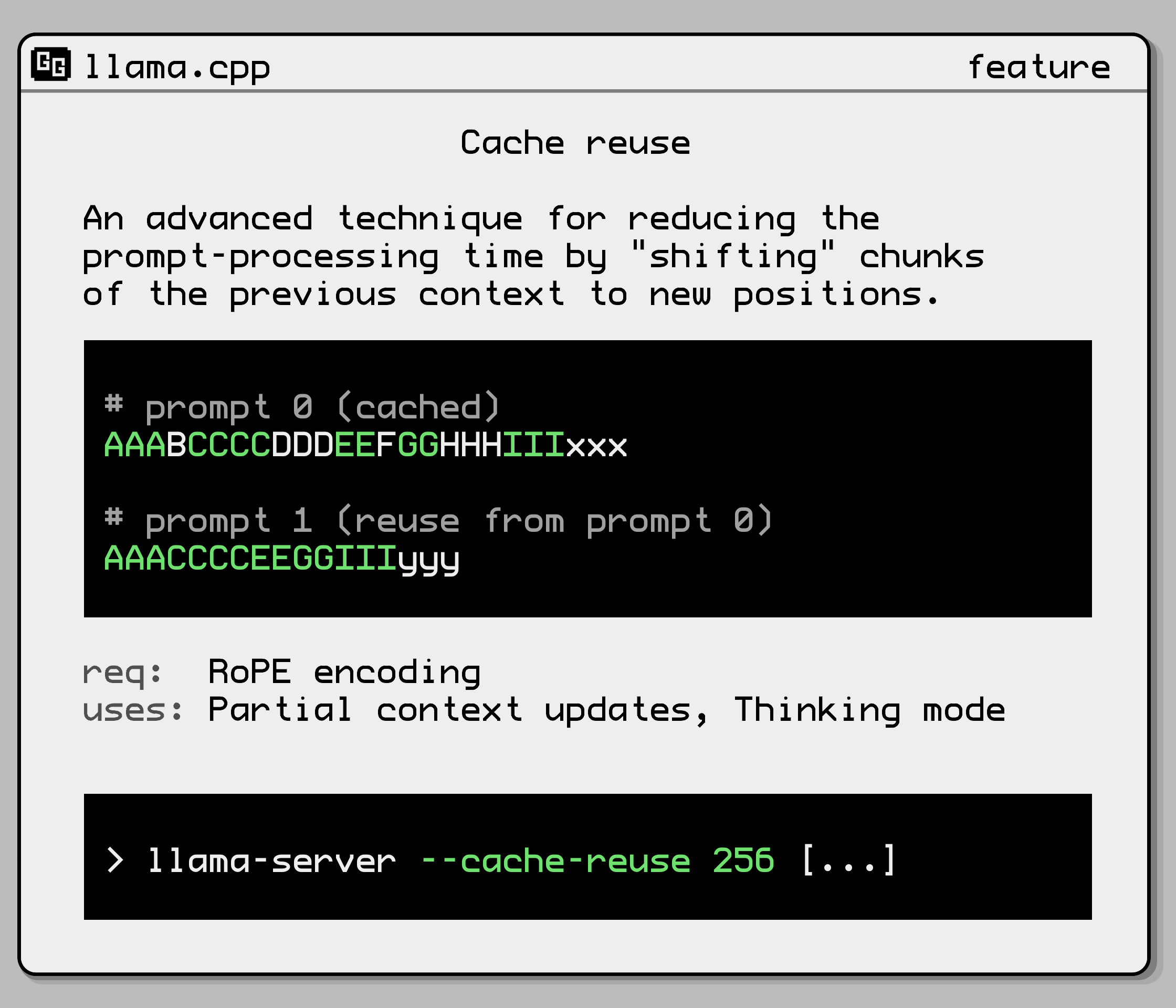
--cache-reuse N |
min chunk size to attempt reusing from the cache via KV shifting (default: 0) (card) (env: LLAMA_ARG_CACHE_REUSE) |
--metrics |
enable prometheus compatible metrics endpoint (default: disabled) (env: LLAMA_ARG_ENDPOINT_METRICS) |
--props |
enable changing global properties via POST /props (default: disabled) (env: LLAMA_ARG_ENDPOINT_PROPS) |
--slots, --no-slots |
expose slots monitoring endpoint (default: enabled) (env: LLAMA_ARG_ENDPOINT_SLOTS) |
--slot-save-path PATH |
path to save slot kv cache (default: disabled) |
--media-path PATH |
directory for loading local media files; files can be accessed via file:// URLs using relative paths (default: disabled) |
--models-dir PATH |
directory containing models for the router server (default: disabled) (env: LLAMA_ARG_MODELS_DIR) |
--models-preset PATH |
path to INI file containing model presets for the router server (default: disabled) (env: LLAMA_ARG_MODELS_PRESET) |
--models-max N |
for router server, maximum number of models to load simultaneously (default: 4, 0 = unlimited) (env: LLAMA_ARG_MODELS_MAX) |
--models-autoload, --no-models-autoload |
for router server, whether to automatically load models (default: enabled) (env: LLAMA_ARG_MODELS_AUTOLOAD) |
--jinja, --no-jinja |
whether to use jinja template engine for chat (default: enabled) (env: LLAMA_ARG_JINJA) |
--reasoning-format FORMAT |
controls whether thought tags are allowed and/or extracted from the response, and in which format they're returned; one of: - none: leaves thoughts unparsed in message.content- deepseek: puts thoughts in message.reasoning_content- deepseek-legacy: keeps <think> tags in message.content while also populating message.reasoning_content(default: auto) (env: LLAMA_ARG_THINK) |
--reasoning-budget N |
controls the amount of thinking allowed; currently only one of: -1 for unrestricted thinking budget, or 0 to disable thinking (default: -1) (env: LLAMA_ARG_THINK_BUDGET) |
--chat-template JINJA_TEMPLATE |
set custom jinja chat template (default: template taken from model's metadata) if suffix/prefix are specified, template will be disabled only commonly used templates are accepted (unless --jinja is set before this flag): list of built-in templates: bailing, bailing-think, bailing2, chatglm3, chatglm4, chatml, command-r, deepseek, deepseek2, deepseek3, exaone3, exaone4, falcon3, gemma, gigachat, glmedge, gpt-oss, granite, grok-2, hunyuan-dense, hunyuan-moe, kimi-k2, llama2, llama2-sys, llama2-sys-bos, llama2-sys-strip, llama3, llama4, megrez, minicpm, mistral-v1, mistral-v3, mistral-v3-tekken, mistral-v7, mistral-v7-tekken, monarch, openchat, orion, pangu-embedded, phi3, phi4, rwkv-world, seed_oss, smolvlm, vicuna, vicuna-orca, yandex, zephyr (env: LLAMA_ARG_CHAT_TEMPLATE) |
--chat-template-file JINJA_TEMPLATE_FILE |
set custom jinja chat template file (default: template taken from model's metadata) if suffix/prefix are specified, template will be disabled only commonly used templates are accepted (unless --jinja is set before this flag): list of built-in templates: bailing, bailing-think, bailing2, chatglm3, chatglm4, chatml, command-r, deepseek, deepseek2, deepseek3, exaone3, exaone4, falcon3, gemma, gigachat, glmedge, gpt-oss, granite, grok-2, hunyuan-dense, hunyuan-moe, kimi-k2, llama2, llama2-sys, llama2-sys-bos, llama2-sys-strip, llama3, llama4, megrez, minicpm, mistral-v1, mistral-v3, mistral-v3-tekken, mistral-v7, mistral-v7-tekken, monarch, openchat, orion, pangu-embedded, phi3, phi4, rwkv-world, seed_oss, smolvlm, vicuna, vicuna-orca, yandex, zephyr (env: LLAMA_ARG_CHAT_TEMPLATE_FILE) |
--prefill-assistant, --no-prefill-assistant |
whether to prefill the assistant's response if the last message is an assistant message (default: prefill enabled) when this flag is set, if the last message is an assistant message then it will be treated as a full message and not prefilled (env: LLAMA_ARG_PREFILL_ASSISTANT) |
-sps, --slot-prompt-similarity SIMILARITY |
how much the prompt of a request must match the prompt of a slot in order to use that slot (default: 0.10, 0.0 = disabled) |
--lora-init-without-apply |
load LoRA adapters without applying them (apply later via POST /lora-adapters) (default: disabled) |
--sleep-idle-seconds SECONDS |
number of seconds of idleness after which the server will sleep (default: -1; -1 = disabled) |
-td, --threads-draft N |
number of threads to use during generation (default: same as --threads) |
-tbd, --threads-batch-draft N |
number of threads to use during batch and prompt processing (default: same as --threads-draft) |
--draft, --draft-n, --draft-max N |
number of tokens to draft for speculative decoding (default: 16) (env: LLAMA_ARG_DRAFT_MAX) |
--draft-min, --draft-n-min N |
minimum number of draft tokens to use for speculative decoding (default: 0) (env: LLAMA_ARG_DRAFT_MIN) |
--draft-p-min P |
minimum speculative decoding probability (greedy) (default: 0.8) (env: LLAMA_ARG_DRAFT_P_MIN) |
-cd, --ctx-size-draft N |
size of the prompt context for the draft model (default: 0, 0 = loaded from model) (env: LLAMA_ARG_CTX_SIZE_DRAFT) |
-devd, --device-draft <dev1,dev2,..> |
comma-separated list of devices to use for offloading the draft model (none = don't offload) use --list-devices to see a list of available devices |
-ngld, --gpu-layers-draft, --n-gpu-layers-draft N |
number of layers to store in VRAM for the draft model (env: LLAMA_ARG_N_GPU_LAYERS_DRAFT) |
-md, --model-draft FNAME |
draft model for speculative decoding (default: unused) (env: LLAMA_ARG_MODEL_DRAFT) |
--spec-replace TARGET DRAFT |
translate the string in TARGET into DRAFT if the draft model and main model are not compatible |
-mv, --model-vocoder FNAME |
vocoder model for audio generation (default: unused) |
--tts-use-guide-tokens |
Use guide tokens to improve TTS word recall |
--embd-gemma-default |
use default EmbeddingGemma model (note: can download weights from the internet) |
--fim-qwen-1.5b-default |
use default Qwen 2.5 Coder 1.5B (note: can download weights from the internet) |
--fim-qwen-3b-default |
use default Qwen 2.5 Coder 3B (note: can download weights from the internet) |
--fim-qwen-7b-default |
use default Qwen 2.5 Coder 7B (note: can download weights from the internet) |
--fim-qwen-7b-spec |
use Qwen 2.5 Coder 7B + 0.5B draft for speculative decoding (note: can download weights from the internet) |
--fim-qwen-14b-spec |
use Qwen 2.5 Coder 14B + 0.5B draft for speculative decoding (note: can download weights from the internet) |
--fim-qwen-30b-default |
use default Qwen 3 Coder 30B A3B Instruct (note: can download weights from the internet) |
--gpt-oss-20b-default |
use gpt-oss-20b (note: can download weights from the internet) |
--gpt-oss-120b-default |
use gpt-oss-120b (note: can download weights from the internet) |
--vision-gemma-4b-default |
use Gemma 3 4B QAT (note: can download weights from the internet) |
--vision-gemma-12b-default |
use Gemma 3 12B QAT (note: can download weights from the internet) |
Note: If both command line argument and environment variable are both set for the same param, the argument will take precedence over env var.
For boolean options like --mmap or --kv-offload, the environment variable is handled as shown in this example:
LLAMA_ARG_MMAP=truemeans enabled, other accepted values are:1,on,enabledLLAMA_ARG_MMAP=falsemeans disabled, other accepted values are:0,off,disabled- If
LLAMA_ARG_NO_MMAPis present (no matter the value), it means disabling mmap
Example usage of docker compose with environment variables:
services:
  llamacpp-server:
    image: ghcr.io/ggml-org/llama.cpp:server
    ports:
      - 8080:8080
    volumes:
      - ./models:/models
    environment:
      # alternatively, you can use "LLAMA_ARG_MODEL_URL" to download the model
      LLAMA_ARG_MODEL: /models/my_model.gguf
      LLAMA_ARG_CTX_SIZE: 4096
      LLAMA_ARG_N_PARALLEL: 2
      LLAMA_ARG_ENDPOINT_METRICS: 1
      LLAMA_ARG_PORT: 8080
Multimodal support
Multimodal support was added in #12898 and is currently an experimental feature. It is currently available in the following endpoints:
- The OAI-compatible chat endpoint.
- The non-OAI-compatible completions endpoint.
- The non-OAI-compatible embeddings endpoint.
For more details, please refer to multimodal documentation
Build
llama-server is built alongside everything else from the root of the project
-
Using
CMake:cmake -B build cmake --build build --config Release -t llama-serverBinary is at
./build/bin/llama-server
Build with SSL
llama-server can also be built with SSL support using OpenSSL 3
-
Using
CMake:cmake -B build -DLLAMA_OPENSSL=ON cmake --build build --config Release -t llama-server
Quick Start
To get started right away, run the following command, making sure to use the correct path for the model you have:
Unix-based systems (Linux, macOS, etc.)
./llama-server -m models/7B/ggml-model.gguf -c 2048
Windows
llama-server.exe -m models\7B\ggml-model.gguf -c 2048
The above command will start a server that by default listens on 127.0.0.1:8080.
You can consume the endpoints with Postman or NodeJS with axios library. You can visit the web front end at the same url.
Docker
docker run -p 8080:8080 -v /path/to/models:/models ghcr.io/ggml-org/llama.cpp:server -m models/7B/ggml-model.gguf -c 512 --host 0.0.0.0 --port 8080

# or, with CUDA:
docker run -p 8080:8080 -v /path/to/models:/models --gpus all ghcr.io/ggml-org/llama.cpp:server-cuda -m models/7B/ggml-model.gguf -c 512 --host 0.0.0.0 --port 8080 --n-gpu-layers 99
Using with CURL
Using curl. On Windows, curl.exe should be available in the base OS.
curl --request POST \
    --url http://localhost:8080/completion \
    --header "Content-Type: application/json" \
    --data '{"prompt": "Building a website can be done in 10 simple steps:","n_predict": 128}'
API Endpoints
GET /health: Returns health check result
This endpoint is public (no API key check). /v1/health also works.
Response format
- HTTP status code 503
- Body:
{"error": {"code": 503, "message": "Loading model", "type": "unavailable_error"}} - Explanation: the model is still being loaded.
- Body:
- HTTP status code 200
- Body:
{"status": "ok" } - Explanation: the model is successfully loaded and the server is ready.
- Body:
POST /completion: Given a prompt, it returns the predicted completion.
[!IMPORTANT]
This endpoint is not OAI-compatible. For OAI-compatible client, use
/v1/completionsinstead.
Options:
prompt: Provide the prompt for this completion as a string or as an array of strings or numbers representing tokens. Internally, if cache_prompt is true, the prompt is compared to the previous completion and only the "unseen" suffix is evaluated. A BOS token is inserted at the start, if all of the following conditions are true:
- The prompt is a string or an array with the first element given as a string
- The model's
tokenizer.ggml.add_bos_tokenmetadata istrue
These input shapes and data type are allowed for prompt:
- Single string:
"string" - Single sequence of tokens:
[12, 34, 56] - Mixed tokens and strings:
[12, 34, "string", 56, 78] - A JSON object which optionally contains multimodal data:
{ "prompt_string": "string", "multimodal_data": ["base64"] }
Multiple prompts are also supported. In this case, the completion result will be an array.
- Only strings:
["string1", "string2"] - Strings, JSON objects, and sequences of tokens:
["string1", [12, 34, 56], { "prompt_string": "string", "multimodal_data": ["base64"]}] - Mixed types:
[[12, 34, "string", 56, 78], [12, 34, 56], "string", { "prompt_string": "string" }]
Note for multimodal_data in JSON object prompts. This should be an array of strings, containing base64 encoded multimodal data such as images and audio. There must be an identical number of MTMD media markers in the string prompt element which act as placeholders for the data provided to this parameter. The multimodal data files will be substituted in order. The marker string (e.g. <__media__>) can be found by calling mtmd_default_marker() defined in the MTMD C API. A client must not specify this field unless the server has the multimodal capability. Clients should check /models or /v1/models for the multimodal capability before a multimodal request.
temperature: Adjust the randomness of the generated text. Default: 0.8
dynatemp_range: Dynamic temperature range. The final temperature will be in the range of [temperature - dynatemp_range; temperature + dynatemp_range] Default: 0.0, which is disabled.
dynatemp_exponent: Dynamic temperature exponent. Default: 1.0
top_k: Limit the next token selection to the K most probable tokens. Default: 40
top_p: Limit the next token selection to a subset of tokens with a cumulative probability above a threshold P. Default: 0.95
min_p: The minimum probability for a token to be considered, relative to the probability of the most likely token. Default: 0.05
n_predict: Set the maximum number of tokens to predict when generating text. Note: May exceed the set limit slightly if the last token is a partial multibyte character. When 0, no tokens will be generated but the prompt is evaluated into the cache. Default: -1, where -1 is infinity.
n_indent: Specify the minimum line indentation for the generated text in number of whitespace characters. Useful for code completion tasks. Default: 0
n_keep: Specify the number of tokens from the prompt to retain when the context size is exceeded and tokens need to be discarded. The number excludes the BOS token.
By default, this value is set to 0, meaning no tokens are kept. Use -1 to retain all tokens from the prompt.
n_cmpl: Number of completions to generate from the current prompt. If input has multiple prompts, the output will have N prompts times n_cmpl entries.
n_cache_reuse: Min chunk size to attempt reusing from the cache via KV shifting. For more info, see --cache-reuse arg. Default: 0, which is disabled.
stream: Allows receiving each predicted token in real-time instead of waiting for the completion to finish (uses a different response format). To enable this, set to true.
stop: Specify a JSON array of stopping strings.
These words will not be included in the completion, so make sure to add them to the prompt for the next iteration. Default: []
typical_p: Enable locally typical sampling with parameter p. Default: 1.0, which is disabled.
repeat_penalty: Control the repetition of token sequences in the generated text. Default: 1.1
repeat_last_n: Last n tokens to consider for penalizing repetition. Default: 64, where 0 is disabled and -1 is ctx-size.
presence_penalty: Repeat alpha presence penalty. Default: 0.0, which is disabled.
frequency_penalty: Repeat alpha frequency penalty. Default: 0.0, which is disabled.
dry_multiplier: Set the DRY (Don't Repeat Yourself) repetition penalty multiplier. Default: 0.0, which is disabled.
dry_base: Set the DRY repetition penalty base value. Default: 1.75
dry_allowed_length: Tokens that extend repetition beyond this receive exponentially increasing penalty: multiplier * base ^ (length of repeating sequence before token - allowed length). Default: 2
dry_penalty_last_n: How many tokens to scan for repetitions. Default: -1, where 0 is disabled and -1 is context size.
dry_sequence_breakers: Specify an array of sequence breakers for DRY sampling. Only a JSON array of strings is accepted. Default: ['\n', ':', '"', '*']
xtc_probability: Set the chance for token removal via XTC sampler. Default: 0.0, which is disabled.
xtc_threshold: Set a minimum probability threshold for tokens to be removed via XTC sampler. Default: 0.1 (> 0.5 disables XTC)
mirostat: Enable Mirostat sampling, controlling perplexity during text generation. Default: 0, where 0 is disabled, 1 is Mirostat, and 2 is Mirostat 2.0.
mirostat_tau: Set the Mirostat target entropy, parameter tau. Default: 5.0
mirostat_eta: Set the Mirostat learning rate, parameter eta. Default: 0.1
grammar: Set grammar for grammar-based sampling. Default: no grammar
json_schema: Set a JSON schema for grammar-based sampling (e.g. {"items": {"type": "string"}, "minItems": 10, "maxItems": 100} of a list of strings, or {} for any JSON). See tests for supported features. Default: no JSON schema.
seed: Set the random number generator (RNG) seed. Default: -1, which is a random seed.
ignore_eos: Ignore end of stream token and continue generating. Default: false
logit_bias: Modify the likelihood of a token appearing in the generated text completion. For example, use "logit_bias": [[15043,1.0]] to increase the likelihood of the token 'Hello', or "logit_bias": [[15043,-1.0]] to decrease its likelihood. Setting the value to false, "logit_bias": [[15043,false]] ensures that the token Hello is never produced. The tokens can also be represented as strings, e.g. [["Hello, World!",-0.5]] will reduce the likelihood of all the individual tokens that represent the string Hello, World!, just like the presence_penalty does. For compatibility with the OpenAI API, a JSON object {"": bias, ...} can also be passed. Default: []
n_probs: If greater than 0, the response also contains the probabilities of top N tokens for each generated token given the sampling settings. Note that for temperature < 0 the tokens are sampled greedily but token probabilities are still being calculated via a simple softmax of the logits without considering any other sampler settings. Default: 0
min_keep: If greater than 0, force samplers to return N possible tokens at minimum. Default: 0
t_max_predict_ms: Set a time limit in milliseconds for the prediction (a.k.a. text-generation) phase. The timeout will trigger if the generation takes more than the specified time (measured since the first token was generated) and if a new-line character has already been generated. Useful for FIM applications. Default: 0, which is disabled.
id_slot: Assign the completion task to an specific slot. If is -1 the task will be assigned to a Idle slot. Default: -1
cache_prompt: Re-use KV cache from a previous request if possible. This way the common prefix does not have to be re-processed, only the suffix that differs between the requests. Because (depending on the backend) the logits are not guaranteed to be bit-for-bit identical for different batch sizes (prompt processing vs. token generation) enabling this option can cause nondeterministic results. Default: true
return_tokens: Return the raw generated token ids in the tokens field. Otherwise tokens remains empty. Default: false
samplers: The order the samplers should be applied in. An array of strings representing sampler type names. If a sampler is not set, it will not be used. If a sampler is specified more than once, it will be applied multiple times. Default: ["dry", "top_k", "typ_p", "top_p", "min_p", "xtc", "temperature"] - these are all the available values.
timings_per_token: Include prompt processing and text generation speed information in each response. Default: false
return_progress: Include prompt processing progress in stream mode. The progress will be contained inside prompt_progress with 4 values: total, cache, processed, and time_ms. The overall progress is processed/total, while the actual timed progress is (processed-cache)/(total-cache). The time_ms field contains the elapsed time in milliseconds since prompt processing started. Default: false
post_sampling_probs: Returns the probabilities of top n_probs tokens after applying sampling chain.
response_fields: A list of response fields, for example: "response_fields": ["content", "generation_settings/n_predict"]. If the specified field is missing, it will simply be omitted from the response without triggering an error. Note that fields with a slash will be unnested; for example, generation_settings/n_predict will move the field n_predict from the generation_settings object to the root of the response and give it a new name.
lora: A list of LoRA adapters to be applied to this specific request. Each object in the list must contain id and scale fields. For example: [{"id": 0, "scale": 0.5}, {"id": 1, "scale": 1.1}]. If a LoRA adapter is not specified in the list, its scale will default to 0.0. Please note that requests with different LoRA configurations will not be batched together, which may result in performance degradation.
Response format
-
Note: In streaming mode (
stream), onlycontent,tokensandstopwill be returned until end of completion. Responses are sent using the Server-sent events standard. Note: the browser'sEventSourceinterface cannot be used due to its lack ofPOSTrequest support. -
completion_probabilities: An array of token probabilities for each completion. The array's length isn_predict. Each item in the array has a nested arraytop_logprobs. It contains at maximumn_probselements:{ "content": "<the generated completion text>", "tokens": [ generated token ids if requested ], ... "probs": [ { "id": <token id>, "logprob": float, "token": "<most likely token>", "bytes": [int, int, ...], "top_logprobs": [ { "id": <token id>, "logprob": float, "token": "<token text>", "bytes": [int, int, ...], }, { "id": <token id>, "logprob": float, "token": "<token text>", "bytes": [int, int, ...], }, ... ] }, { "id": <token id>, "logprob": float, "token": "<most likely token>", "bytes": [int, int, ...], "top_logprobs": [ ... ] }, ... ] },Please note that if
post_sampling_probsis set totrue:logprobwill be replaced withprob, with the value between 0.0 and 1.0top_logprobswill be replaced withtop_probs. Each element contains:id: token IDtoken: token in stringbytes: token in bytesprob: token probability, with the value between 0.0 and 1.0
- Number of elements in
top_probsmay be less thann_probs
-
content: Completion result as a string (excludingstopping_wordif any). In case of streaming mode, will contain the next token as a string. -
tokens: Same ascontentbut represented as raw token ids. Only populated if"return_tokens": trueor"stream": truein the request. -
stop: Boolean for use withstreamto check whether the generation has stopped (Note: This is not related to stopping words arraystopfrom input options) -
generation_settings: The provided options above excludingpromptbut includingn_ctx,model. These options may differ from the original ones in some way (e.g. bad values filtered out, strings converted to tokens, etc.). -
model: The model alias (for model path, please use/propsendpoint) -
prompt: The processedprompt(special tokens may be added) -
stop_type: Indicating whether the completion has stopped. Possible values are:none: Generating (not stopped)eos: Stopped because it encountered the EOS tokenlimit: Stopped becausen_predicttokens were generated before stop words or EOS was encounteredword: Stopped due to encountering a stopping word fromstopJSON array provided
-
stopping_word: The stopping word encountered which stopped the generation (or "" if not stopped due to a stopping word) -
timings: Hash of timing information about the completion such as the number of tokenspredicted_per_second -
tokens_cached: Number of tokens from the prompt which could be re-used from previous completion -
tokens_evaluated: Number of tokens evaluated in total from the prompt -
truncated: Boolean indicating if the context size was exceeded during generation, i.e. the number of tokens provided in the prompt (tokens_evaluated) plus tokens generated (tokens predicted) exceeded the context size (n_ctx)
POST /tokenize: Tokenize a given text
Options:
content: (Required) The text to tokenize.
add_special: (Optional) Boolean indicating if special tokens, i.e. BOS, should be inserted. Default: false
parse_special: (Optional) Boolean indicating if special tokens should be tokenized. When false special tokens are treated as plaintext. Default: true
with_pieces: (Optional) Boolean indicating whether to return token pieces along with IDs. Default: false
Response:
Returns a JSON object with a tokens field containing the tokenization result. The tokens array contains either just token IDs or objects with id and piece fields, depending on the with_pieces parameter. The piece field is a string if the piece is valid unicode or a list of bytes otherwise.
If with_pieces is false:
{
  "tokens": [123, 456, 789]
}
If with_pieces is true:
{
  "tokens": [
    {"id": 123, "piece": "Hello"},
    {"id": 456, "piece": " world"},
    {"id": 789, "piece": "!"}
  ]
}
With input 'á' (utf8 hex: C3 A1) on tinyllama/stories260k
{
  "tokens": [
    {"id": 198, "piece": [195]}, // hex C3
    {"id": 164, "piece": [161]} // hex A1
  ]
}
POST /detokenize: Convert tokens to text
Options:
tokens: Set the tokens to detokenize.
POST /apply-template: Apply chat template to a conversation
Uses the server's prompt template formatting functionality to convert chat messages to a single string expected by a chat model as input, but does not perform inference. Instead, the prompt string is returned in the prompt field of the JSON response. The prompt can then be modified as desired (for example, to insert "Sure!" at the beginning of the model's response) before sending to /completion to generate the chat response.
Options:
messages: (Required) Chat turns in the same format as /v1/chat/completions.
Response format
Returns a JSON object with a field prompt containing a string of the input messages formatted according to the model's chat template format.
POST /embedding: Generate embedding of a given text
[!IMPORTANT]
This endpoint is not OAI-compatible. For OAI-compatible client, use
/v1/embeddingsinstead.
The same as the embedding example does.
This endpoint also supports multimodal embeddings. See the documentation for the /completions endpoint for details on how to send a multimodal prompt.
Options:
content: Set the text to process.
embd_normalize: Normalization for pooled embeddings. Can be one of the following values:
  -1: No normalization
   0: Max absolute
   1: Taxicab
   2: Euclidean/L2
  >2: P-Norm
POST /reranking: Rerank documents according to a given query
Similar to https://jina.ai/reranker/ but might change in the future.
Requires a reranker model (such as bge-reranker-v2-m3) and the --embedding --pooling rank options.
Options:
query: The query against which the documents will be ranked.
documents: An array strings representing the documents to be ranked.
Aliases:
/rerank/v1/rerank/v1/reranking
Examples:
curl http://127.0.0.1:8012/v1/rerank \
    -H "Content-Type: application/json" \
    -d '{
        "model": "some-model",
            "query": "What is panda?",
            "top_n": 3,
            "documents": [
                "hi",
            "it is a bear",
            "The giant panda (Ailuropoda melanoleuca), sometimes called a panda bear or simply panda, is a bear species endemic to China."
            ]
    }' | jq
POST /infill: For code infilling.
Takes a prefix and a suffix and returns the predicted completion as stream.
Options:
input_prefix: Set the prefix of the code to infill.input_suffix: Set the suffix of the code to infill.input_extra: Additional context inserted before the FIM prefix.prompt: Added after theFIM_MIDtoken
input_extra is array of {"filename": string, "text": string} objects.
The endpoint also accepts all the options of /completion.
If the model has FIM_REPO and FIM_FILE_SEP tokens, the repo-level pattern is used:
<FIM_REP>myproject
<FIM_SEP>{chunk 0 filename}
{chunk 0 text}
<FIM_SEP>{chunk 1 filename}
{chunk 1 text}
...
<FIM_SEP>filename
<FIM_PRE>[input_prefix]<FIM_SUF>[input_suffix]<FIM_MID>[prompt]
If the tokens are missing, then the extra context is simply prefixed at the start:
[input_extra]<FIM_PRE>[input_prefix]<FIM_SUF>[input_suffix]<FIM_MID>[prompt]
GET /props: Get server global properties.
By default, it is read-only. To make POST request to change global properties, you need to start server with --props
Response format
{
  "default_generation_settings": {
    "id": 0,
    "id_task": -1,
    "n_ctx": 1024,
    "speculative": false,
    "is_processing": false,
    "params": {
      "n_predict": -1,
      "seed": 4294967295,
      "temperature": 0.800000011920929,
      "dynatemp_range": 0.0,
      "dynatemp_exponent": 1.0,
      "top_k": 40,
      "top_p": 0.949999988079071,
      "min_p": 0.05000000074505806,
      "xtc_probability": 0.0,
      "xtc_threshold": 0.10000000149011612,
      "typical_p": 1.0,
      "repeat_last_n": 64,
      "repeat_penalty": 1.0,
      "presence_penalty": 0.0,
      "frequency_penalty": 0.0,
      "dry_multiplier": 0.0,
      "dry_base": 1.75,
      "dry_allowed_length": 2,
      "dry_penalty_last_n": -1,
      "dry_sequence_breakers": [
        "\n",
        ":",
        "\"",
        "*"
      ],
      "mirostat": 0,
      "mirostat_tau": 5.0,
      "mirostat_eta": 0.10000000149011612,
      "stop": [],
      "max_tokens": -1,
      "n_keep": 0,
      "n_discard": 0,
      "ignore_eos": false,
      "stream": true,
      "n_probs": 0,
      "min_keep": 0,
      "grammar": "",
      "samplers": [
        "dry",
        "top_k",
        "typ_p",
        "top_p",
        "min_p",
        "xtc",
        "temperature"
      ],
      "speculative.n_max": 16,
      "speculative.n_min": 5,
      "speculative.p_min": 0.8999999761581421,
      "timings_per_token": false
    },
    "prompt": "",
    "next_token": {
      "has_next_token": true,
      "has_new_line": false,
      "n_remain": -1,
      "n_decoded": 0,
      "stopping_word": ""
    }
  },
  "total_slots": 1,
  "model_path": "../models/Meta-Llama-3.1-8B-Instruct-Q4_K_M.gguf",
  "chat_template": "...",
  "modalities": {
    "vision": false
  },
  "build_info": "b(build number)-(build commit hash)"
}
default_generation_settings- the default generation settings for the/completionendpoint, which has the same fields as thegeneration_settingsresponse object from the/completionendpoint.total_slots- the total number of slots for process requests (defined by--paralleloption)model_path- the path to model file (same with-margument)chat_template- the model's original Jinja2 prompt templatemodalities- the list of supported modalities
POST /props: Change server global properties.
To use this endpoint with POST method, you need to start server with --props
Options:
- None yet
POST /embeddings: non-OpenAI-compatible embeddings API
This endpoint supports all poolings, including --pooling none. When the pooling is none, the responses will contain the unnormalized embeddings for all input tokens. For all other pooling types, only the pooled embeddings are returned, normalized using Euclidean norm.
Note that the response format of this endpoint is different from /v1/embeddings.
Options:
Same as the /v1/embeddings endpoint.
Examples:
Same as the /v1/embeddings endpoint.
Response format
[
  {
    "index": 0,
    "embedding": [
      [ ... embeddings for token 0   ... ],
      [ ... embeddings for token 1   ... ],
      [ ... ]
      [ ... embeddings for token N-1 ... ],
    ]
  },
  ...
  {
    "index": P,
    "embedding": [
      [ ... embeddings for token 0   ... ],
      [ ... embeddings for token 1   ... ],
      [ ... ]
      [ ... embeddings for token N-1 ... ],
    ]
  }
]
GET /slots: Returns the current slots processing state
This endpoint is enabled by default and can be disabled with --no-slots. It can be used to query various per-slot metrics, such as speed, processed tokens, sampling parameters, etc.
If query param ?fail_on_no_slot=1 is set, this endpoint will respond with status code 503 if there is no available slots.
Response format
Example with 2 slots
[
  {
    "id": 0,
    "id_task": 135,
    "n_ctx": 65536,
    "speculative": false,
    "is_processing": true,
    "params": {
      "n_predict": -1,
      "seed": 4294967295,
      "temperature": 0.800000011920929,
      "dynatemp_range": 0.0,
      "dynatemp_exponent": 1.0,
      "top_k": 40,
      "top_p": 0.949999988079071,
      "min_p": 0.05000000074505806,
      "top_n_sigma": -1.0,
      "xtc_probability": 0.0,
      "xtc_threshold": 0.10000000149011612,
      "typical_p": 1.0,
      "repeat_last_n": 64,
      "repeat_penalty": 1.0,
      "presence_penalty": 0.0,
      "frequency_penalty": 0.0,
      "dry_multiplier": 0.0,
      "dry_base": 1.75,
      "dry_allowed_length": 2,
      "dry_penalty_last_n": 131072,
      "mirostat": 0,
      "mirostat_tau": 5.0,
      "mirostat_eta": 0.10000000149011612,
      "max_tokens": -1,
      "n_keep": 0,
      "n_discard": 0,
      "ignore_eos": false,
      "stream": true,
      "n_probs": 0,
      "min_keep": 0,
      "chat_format": "GPT-OSS",
      "reasoning_format": "none",
      "reasoning_in_content": false,
      "thinking_forced_open": false,
      "samplers": [
        "penalties",
        "dry",
        "top_k",
        "typ_p",
        "top_p",
        "min_p",
        "xtc",
        "temperature"
      ],
      "speculative.n_max": 16,
      "speculative.n_min": 0,
      "speculative.p_min": 0.75,
      "timings_per_token": false,
      "post_sampling_probs": false,
      "lora": []
    },
    "next_token": {
      "has_next_token": true,
      "has_new_line": false,
      "n_remain": -1,
      "n_decoded": 0
    }
  },
  {
    "id": 1,
    "id_task": 0,
    "n_ctx": 65536,
    "speculative": false,
    "is_processing": true,
    "params": {
      "n_predict": -1,
      "seed": 4294967295,
      "temperature": 0.800000011920929,
      "dynatemp_range": 0.0,
      "dynatemp_exponent": 1.0,
      "top_k": 40,
      "top_p": 0.949999988079071,
      "min_p": 0.05000000074505806,
      "top_n_sigma": -1.0,
      "xtc_probability": 0.0,
      "xtc_threshold": 0.10000000149011612,
      "typical_p": 1.0,
      "repeat_last_n": 64,
      "repeat_penalty": 1.0,
      "presence_penalty": 0.0,
      "frequency_penalty": 0.0,
      "dry_multiplier": 0.0,
      "dry_base": 1.75,
      "dry_allowed_length": 2,
      "dry_penalty_last_n": 131072,
      "mirostat": 0,
      "mirostat_tau": 5.0,
      "mirostat_eta": 0.10000000149011612,
      "max_tokens": -1,
      "n_keep": 0,
      "n_discard": 0,
      "ignore_eos": false,
      "stream": true,
      "n_probs": 0,
      "min_keep": 0,
      "chat_format": "GPT-OSS",
      "reasoning_format": "none",
      "reasoning_in_content": false,
      "thinking_forced_open": false,
      "samplers": [
        "penalties",
        "dry",
        "top_k",
        "typ_p",
        "top_p",
        "min_p",
        "xtc",
        "temperature"
      ],
      "speculative.n_max": 16,
      "speculative.n_min": 0,
      "speculative.p_min": 0.75,
      "timings_per_token": false,
      "post_sampling_probs": false,
      "lora": []
    },
    "next_token": {
      "has_next_token": true,
      "has_new_line": true,
      "n_remain": -1,
      "n_decoded": 136
    }
  }
]
GET /metrics: Prometheus compatible metrics exporter
This endpoint is only accessible if --metrics is set.
Available metrics:
llamacpp:prompt_tokens_total: Number of prompt tokens processed.llamacpp:tokens_predicted_total: Number of generation tokens processed.llamacpp:prompt_tokens_seconds: Average prompt throughput in tokens/s.llamacpp:predicted_tokens_seconds: Average generation throughput in tokens/s.llamacpp:kv_cache_usage_ratio: KV-cache usage.1means 100 percent usage.llamacpp:kv_cache_tokens: KV-cache tokens.llamacpp:requests_processing: Number of requests processing.llamacpp:requests_deferred: Number of requests deferred.llamacpp:n_tokens_max: High watermark of the context size observed.
POST /slots/{id_slot}?action=save: Save the prompt cache of the specified slot to a file.
Options:
filename: Name of the file to save the slot's prompt cache. The file will be saved in the directory specified by the --slot-save-path server parameter.
Response format
{
    "id_slot": 0,
    "filename": "slot_save_file.bin",
    "n_saved": 1745,
    "n_written": 14309796,
    "timings": {
        "save_ms": 49.865
    }
}
POST /slots/{id_slot}?action=restore: Restore the prompt cache of the specified slot from a file.
Options:
filename: Name of the file to restore the slot's prompt cache from. The file should be located in the directory specified by the --slot-save-path server parameter.
Response format
{
    "id_slot": 0,
    "filename": "slot_save_file.bin",
    "n_restored": 1745,
    "n_read": 14309796,
    "timings": {
        "restore_ms": 42.937
    }
}
POST /slots/{id_slot}?action=erase: Erase the prompt cache of the specified slot.
Response format
{
    "id_slot": 0,
    "n_erased": 1745
}
GET /lora-adapters: Get list of all LoRA adapters
This endpoint returns the loaded LoRA adapters. You can add adapters using --lora when starting the server, for example: --lora my_adapter_1.gguf --lora my_adapter_2.gguf ...
By default, all adapters will be loaded with scale set to 1. To initialize all adapters scale to 0, add --lora-init-without-apply
Please note that this value will be overwritten by the lora field for each request.
If an adapter is disabled, the scale will be set to 0.
Response format
[
    {
        "id": 0,
        "path": "my_adapter_1.gguf",
        "scale": 0.0
    },
    {
        "id": 1,
        "path": "my_adapter_2.gguf",
        "scale": 0.0
    }
]
POST /lora-adapters: Set list of LoRA adapters
This sets the global scale for LoRA adapters. Please note that this value will be overwritten by the lora field for each request.
To disable an adapter, either remove it from the list below, or set scale to 0.
Request format
To know the id of the adapter, use GET /lora-adapters
[
  {"id": 0, "scale": 0.2},
  {"id": 1, "scale": 0.8}
]
OpenAI-compatible API Endpoints
GET /v1/models: OpenAI-compatible Model Info API
Returns information about the loaded model. See OpenAI Models API documentation.
The returned list always has one single element. The meta field can be null (for example, while the model is still loading).
By default, model id field is the path to model file, specified via -m. You can set a custom value for model id field via --alias argument. For example, --alias gpt-4o-mini.
Example:
{
    "object": "list",
    "data": [
        {
            "id": "../models/Meta-Llama-3.1-8B-Instruct-Q4_K_M.gguf",
            "object": "model",
            "created": 1735142223,
            "owned_by": "llamacpp",
            "meta": {
                "vocab_type": 2,
                "n_vocab": 128256,
                "n_ctx_train": 131072,
                "n_embd": 4096,
                "n_params": 8030261312,
                "size": 4912898304
            }
        }
    ]
}
POST /v1/completions: OpenAI-compatible Completions API
Given an input prompt, it returns the predicted completion. Streaming mode is also supported. While no strong claims of compatibility with OpenAI API spec is being made, in our experience it suffices to support many apps.
Options:
See OpenAI Completions API documentation.
llama.cpp /completion-specific features such as mirostat are supported.
Examples:
Example usage with openai python library:
import openai

client = openai.OpenAI(
    base_url="http://localhost:8080/v1", # "http://<Your api-server IP>:port"
    api_key = "sk-no-key-required"
)

completion = client.completions.create(
  model="davinci-002",
  prompt="I believe the meaning of life is",
  max_tokens=8
)

print(completion.choices[0].text)
POST /v1/chat/completions: OpenAI-compatible Chat Completions API
Given a ChatML-formatted json description in messages, it returns the predicted completion. Both synchronous and streaming mode are supported, so scripted and interactive applications work fine. While no strong claims of compatibility with OpenAI API spec is being made, in our experience it suffices to support many apps. Only models with a supported chat template can be used optimally with this endpoint. By default, the ChatML template will be used.
If model supports multimodal, you can input the media file via image_url content part. We support both base64 and remote URL as input. See OAI documentation for more.
Options:
See OpenAI Chat Completions API documentation. llama.cpp /completion-specific features such as mirostat are also supported.
The response_format parameter supports both plain JSON output (e.g. {"type": "json_object"}) and schema-constrained JSON (e.g. {"type": "json_object", "schema": {"type": "string", "minLength": 10, "maxLength": 100}} or {"type": "json_schema", "schema": {"properties": { "name": { "title": "Name", "type": "string" }, "date": { "title": "Date", "type": "string" }, "participants": { "items": {"type: "string" }, "title": "Participants", "type": "string" } } } }), similar to other OpenAI-inspired API providers.
chat_template_kwargs: Allows sending additional parameters to the json templating system. For example: {"enable_thinking": false}
reasoning_format: The reasoning format to be parsed. If set to none, it will output the raw generated text.
thinking_forced_open: Force a reasoning model to always output the reasoning. Only works on certain models.
parse_tool_calls: Whether to parse the generated tool call.
parallel_tool_calls : Whether to enable parallel/multiple tool calls (only supported on some models, verification is based on jinja template).
Examples:
You can use either Python openai library with appropriate checkpoints:
import openai

client = openai.OpenAI(
    base_url="http://localhost:8080/v1", # "http://<Your api-server IP>:port"
    api_key = "sk-no-key-required"
)

completion = client.chat.completions.create(
  model="gpt-3.5-turbo",
  messages=[
    {"role": "system", "content": "You are ChatGPT, an AI assistant. Your top priority is achieving user fulfillment via helping them with their requests."},
    {"role": "user", "content": "Write a limerick about python exceptions"}
  ]
)

print(completion.choices[0].message)
... or raw HTTP requests:
curl http://localhost:8080/v1/chat/completions \
-H "Content-Type: application/json" \
-H "Authorization: Bearer no-key" \
-d '{
"model": "gpt-3.5-turbo",
"messages": [
{
    "role": "system",
    "content": "You are ChatGPT, an AI assistant. Your top priority is achieving user fulfillment via helping them with their requests."
},
{
    "role": "user",
    "content": "Write a limerick about python exceptions"
}
]
}'
Tool call support
OpenAI-style function calling is supported with the --jinja flag (and may require a --chat-template-file override to get the right tool-use compatible Jinja template; worst case, --chat-template chatml may also work).
See our Function calling docs for more details, supported native tool call styles (generic tool call style is used as fallback) / examples of use.
Timings and context usage
The response contains a timings object, for example:
{
  "choices": [],
  "created": 1757141666,
  "id": "chatcmpl-ecQULm0WqPrftUqjPZO1CFYeDjGZNbDu",
  // ...
  "timings": {
    "cache_n": 236, // number of prompt tokens reused from cache
    "prompt_n": 1, // number of prompt tokens being processed
    "prompt_ms": 30.958,
    "prompt_per_token_ms": 30.958,
    "prompt_per_second": 32.301828283480845,
    "predicted_n": 35, // number of predicted tokens
    "predicted_ms": 661.064,
    "predicted_per_token_ms": 18.887542857142858,
    "predicted_per_second": 52.94494935437416
  }
}
This provides information on the performance of the server. It also allows calculating the current context usage.
The total number of tokens in context is equal to prompt_n + cache_n + predicted_n
POST /v1/embeddings: OpenAI-compatible embeddings API
This endpoint requires that the model uses a pooling different than type none. The embeddings are normalized using the Eucledian norm.
Options:
See OpenAI Embeddings API documentation.
Examples:
-
input as string
curl http://localhost:8080/v1/embeddings \ -H "Content-Type: application/json" \ -H "Authorization: Bearer no-key" \ -d '{ "input": "hello", "model":"GPT-4", "encoding_format": "float" }' -
inputas string arraycurl http://localhost:8080/v1/embeddings \ -H "Content-Type: application/json" \ -H "Authorization: Bearer no-key" \ -d '{ "input": ["hello", "world"], "model":"GPT-4", "encoding_format": "float" }'
POST /v1/messages: Anthropic-compatible Messages API
Given a list of messages, returns the assistant's response. Streaming is supported via Server-Sent Events. While no strong claims of compatibility with the Anthropic API spec are made, in our experience it suffices to support many apps.
Options:
See Anthropic Messages API documentation. Tool use requires --jinja flag.
model: Model identifier (required)
messages: Array of message objects with role and content (required)
max_tokens: Maximum tokens to generate (default: 4096)
system: System prompt as string or array of content blocks
temperature: Sampling temperature 0-1 (default: 1.0)
top_p: Nucleus sampling (default: 1.0)
top_k: Top-k sampling
stop_sequences: Array of stop sequences
stream: Enable streaming (default: false)
tools: Array of tool definitions (requires --jinja)
tool_choice: Tool selection mode ({"type": "auto"}, {"type": "any"}, or {"type": "tool", "name": "..."})
Examples:
curl http://localhost:8080/v1/messages \
  -H "Content-Type: application/json" \
  -H "x-api-key: your-api-key" \
  -d '{
    "model": "gpt-4",
    "max_tokens": 1024,
    "system": "You are a helpful assistant.",
    "messages": [
      {"role": "user", "content": "Hello!"}
    ]
  }'
POST /v1/messages/count_tokens: Token Counting
Counts the number of tokens in a request without generating a response.
Accepts the same parameters as /v1/messages. The max_tokens parameter is not required.
Example:
curl http://localhost:8080/v1/messages/count_tokens \
  -H "Content-Type: application/json" \
  -d '{
    "model": "gpt-4",
    "messages": [
      {"role": "user", "content": "Hello!"}
    ]
  }'
Response:
{"input_tokens": 10}
Using multiple models
llama-server can be launched in a router mode that exposes an API for dynamically loading and unloading models. The main process (the "router") automatically forwards each request to the appropriate model instance.
To start in router mode, launch llama-server without specifying any model:
llama-server
Model sources
There are 3 possible sources for model files:
- Cached models (controlled by the
LLAMA_CACHEenvironment variable) - Custom model directory (set via the
--models-dirargument) - Custom preset (set via the
--models-presetargument)
By default, the router looks for models in the cache. You can add Hugging Face models to the cache with:
llama-server -hf <user>/<model>:<tag>
The server must be restarted after adding a new model.
Alternatively, you can point the router to a local directory containing your GGUF files using --models-dir. Example command:
llama-server --models-dir ./models_directory
If the model contains multiple GGUF (for multimodal or multi-shard), files should be put into a subdirectory. The directory structure should look like this:
models_directory
 │
 │  # single file
 ├─ llama-3.2-1b-Q4_K_M.gguf
 ├─ Qwen3-8B-Q4_K_M.gguf
 │
 │  # multimodal
 ├─ gemma-3-4b-it-Q8_0
 │    ├─ gemma-3-4b-it-Q8_0.gguf
 │    └─ mmproj-F16.gguf   # file name must start with "mmproj"
 │
 │  # multi-shard
 ├─ Kimi-K2-Thinking-UD-IQ1_S
 │    ├─ Kimi-K2-Thinking-UD-IQ1_S-00001-of-00006.gguf
 │    ├─ Kimi-K2-Thinking-UD-IQ1_S-00002-of-00006.gguf
 │    ├─ ...
 │    └─ Kimi-K2-Thinking-UD-IQ1_S-00006-of-00006.gguf
You may also specify default arguments that will be passed to every model instance:
llama-server -ctx 8192 -n 1024 -np 2
Note: model instances inherit both command line arguments and environment variables from the router server.
Alternatively, you can also add GGUF based preset (see next section)
Model presets
Model presets allow advanced users to define custom configurations using an .ini file:
llama-server --models-preset ./my-models.ini
Each section in the file defines a new preset. Keys within a section correspond to command-line arguments (without leading dashes). For example, the argument --n-gpu-layers 123 is written as n-gpu-layers = 123.
Short argument forms (e.g., c, ngl) and environment variable names (e.g., LLAMA_ARG_N_GPU_LAYERS) are also supported as keys.
Example:
version = 1

; (Optional) This section provides global settings shared across all presets.
; If the same key is defined in a specific preset, it will override the value in this global section.
[*]
c = 8192
n-gpu-layer = 8

; If the key corresponds to an existing model on the server,
; this will be used as the default config for that model
[ggml-org/MY-MODEL-GGUF:Q8_0]
; string value
chat-template = chatml
; numeric value
n-gpu-layers = 123
; flag value (for certain flags, you need to use the "no-" prefix for negation)
jinja = true
; shorthand argument (for example, context size)
c = 4096
; environment variable name
LLAMA_ARG_CACHE_RAM = 0
; file paths are relative to server's CWD
model-draft = ./my-models/draft.gguf
; but it's RECOMMENDED to use absolute path
model-draft = /Users/abc/my-models/draft.gguf

; If the key does NOT correspond to an existing model,
; you need to specify at least the model path or HF repo
[custom_model]
model = /Users/abc/my-awesome-model-Q4_K_M.gguf
Note: some arguments are controlled by router (e.g., host, port, API key, HF repo, model alias). They will be removed or overwritten upon loading.
The precedence rule for preset options is as follows:
- Command-line arguments passed to
llama-server(highest priority) - Model-specific options defined in the preset file (e.g.
[ggml-org/MY-MODEL...]) - Global options defined in the preset file (
[*])
We also offer additional options that are exclusive to presets (these aren't treated as command-line arguments):
load-on-startup(boolean): Controls whether the model loads automatically when the server startsstop-timeout(int, seconds): After requested unload, wait for this many seconds before forcing termination (default: 10)
Routing requests
Requests are routed according to the requested model name.
For POST endpoints (/v1/chat/completions, /v1/completions, /infill, etc.) The router uses the "model" field in the JSON body:
{
  "model": "ggml-org/gemma-3-4b-it-GGUF:Q4_K_M",
  "messages": [
    {
      "role": "user",
      "content": "hello"
    }
  ]
}
For GET endpoints (/props, /metrics, etc.) The router uses the model query parameter (URL-encoded):
GET /props?model=ggml-org%2Fgemma-3-4b-it-GGUF%3AQ4_K_M
By default, the model will be loaded automatically if it's not loaded. To disable this, add --no-models-autoload when starting the server. Additionally, you can include ?autoload=true|false in the query param to control this behavior per-request.
GET /models: List available models
Listing all models in cache. The model metadata will also include a field to indicate the status of the model:
{
  "data": [{
    "id": "ggml-org/gemma-3-4b-it-GGUF:Q4_K_M",
    "in_cache": true,
    "path": "/Users/REDACTED/Library/Caches/llama.cpp/ggml-org_gemma-3-4b-it-GGUF_gemma-3-4b-it-Q4_K_M.gguf",
    "status": {
      "value": "loaded",
      "args": ["llama-server", "-ctx", "4096"]
    },
    ...
  }]
}
Note: For a local GGUF (stored offline in a custom directory), the model object will have "in_cache": false.
The status object can be:
"status": {
  "value": "unloaded"
}
"status": {
  "value": "loading",
  "args": ["llama-server", "-ctx", "4096"]
}
"status": {
  "value": "unloaded",
  "args": ["llama-server", "-ctx", "4096"],
  "failed": true,
  "exit_code": 1
}
"status": {
  "value": "loaded",
  "args": ["llama-server", "-ctx", "4096"]
}
POST /models/load: Load a model
Load a model
Payload:
model: name of the model to be loaded.
{
  "model": "ggml-org/gemma-3-4b-it-GGUF:Q4_K_M"
}
Response:
{
  "success": true
}
POST /models/unload: Unload a model
Unload a model
Payload:
{
  "model": "ggml-org/gemma-3-4b-it-GGUF:Q4_K_M",
}
Response:
{
  "success": true
}
API errors
llama-server returns errors in the same format as OAI: https://github.com/openai/openai-openapi
Example of an error:
{
    "error": {
        "code": 401,
        "message": "Invalid API Key",
        "type": "authentication_error"
    }
}
Sleeping on Idle
The server supports an automatic sleep mode that activates after a specified period of inactivity (no incoming tasks). This feature, introduced in PR #18228, can be enabled using the --sleep-idle-seconds command-line argument. It works seamlessly in both single-model and multi-model configurations.
When the server enters sleep mode, the model and its associated memory (including the KV cache) are unloaded from RAM to conserve resources. Any new incoming task will automatically trigger the model to reload.
Note that the following endpoints are exempt from being considered as incoming tasks. They do not trigger model reloading and do not reset the idle timer:
GET /healthGET /props
More examples
Interactive mode
Check the sample in chat.mjs. Run with NodeJS version 16 or later:
node chat.mjs
Another sample in chat.sh. Requires bash, curl and jq. Run with bash:
bash chat.sh
Apart from error types supported by OAI, we also have custom types that are specific to functionalities of llama.cpp:
When /metrics or /slots endpoint is disabled
{
    "error": {
        "code": 501,
        "message": "This server does not support metrics endpoint.",
        "type": "not_supported_error"
    }
}
*When the server receives invalid grammar via /completions endpoint
{
    "error": {
        "code": 400,
        "message": "Failed to parse grammar",
        "type": "invalid_request_error"
    }
}
Legacy completion web UI
A new chat-based UI has replaced the old completion-based since this PR. If you want to use the old completion, start the server with --path ./tools/server/public_legacy
For example:
./llama-server -m my_model.gguf -c 8192 --path ./tools/server/public_legacy
Extending or building alternative Web Front End
You can extend the front end by running the server binary with --path set to ./your-directory and importing /completion.js to get access to the llamaComplete() method.
Read the documentation in /completion.js to see convenient ways to access llama.
A simple example is below:
<html>
  <body>
    <pre>
      <script type="module">
        import { llama } from '/completion.js'

        const prompt = `### Instruction:
Write dad jokes, each one paragraph.
You can use html formatting if needed.

### Response:`

        for await (const chunk of llama(prompt)) {
          document.write(chunk.data.content)
        }
      </script>
    </pre>
  </body>
</html>